<?xml version="1.0" encoding="utf-8"?><feed xmlns="http://www.w3.org/2005/Atom" ><generator uri="https://jekyllrb.com/" version="4.3.4">Jekyll</generator><link href="http://lmhd.me/feed.xml" rel="self" type="application/atom+xml" /><link href="http://lmhd.me/" rel="alternate" type="text/html" /><updated>2024-10-23T12:56:56+01:00</updated><id>http://lmhd.me/feed.xml</id><title type="html">LMHD</title><subtitle>Instigator of DevOps Shenanigans, HashiCorporeal, and Recreational Procrastinatrix</subtitle><entry><title type="html">Terraform apply as code: The multispace pattern</title><link href="http://lmhd.me/tech/2023/07/10/multispace/" rel="alternate" type="text/html" title="Terraform apply as code: The multispace pattern" /><published>2023-07-10T13:00:00+01:00</published><updated>2023-07-10T13:00:00+01:00</updated><id>http://lmhd.me/tech/2023/07/10/multispace</id><content type="html" xml:base="http://lmhd.me/tech/2023/07/10/multispace/"><![CDATA[<p>Terraform Apply… as a Terraform resource. Sounds fun, right? Let’s see how it works.</p>

<!--more-->

<p>When working with Terraform, <a href="https://developer.hashicorp.com/terraform/cloud-docs/recommended-practices/part1">HashiCorp recommends</a> keeping your workspaces small and focused on the resources that make up a single component of a larger infrastructure stack. Doing so has many benefits, but this best practice can introduce dependencies between workspaces, which in turn introduces a new challenge: how do you ensure that these interdependent component workspaces are automatically created (or destroyed) in the right order?</p>

<p>I wrote this blog post to present a pattern to reduce operational overhead from managing multi-workspace deployments. When combined with <a href="https://www.hashicorp.com/blog/new-terraform-cloud-capabilities-to-import-view-and-manage-infrastructure">ephemeral workspaces</a>, a feature coming soon to Terraform Cloud, this pattern can also help reduce costs by allowing you to destroy an entire stack of workspaces in a logical order. I’m a HashiCorp Solutions Engineer who uses this pattern frequently, and it’s used by Terraform creator and HashiCorp Co-Founder Mitchell Hashimoto, and many others.</p>

<p><em><strong>Notes: This method is not an official HashiCorp-recommended best practice and</strong> is not intended to be the solution to all use cases. Rather, it’s just one example to explore and build upon. This blog post also includes a simpler solution to the challenge above, which should work for a large number of use cases. While this blog post was written with Terraform Cloud in mind, the same concepts and configuration will also work in Terraform Enterprise as well, depending on your version. Finally, the suggestions presented here all assume a basic understanding of Terraform Cloud, and you can try out the code examples yourself in this <a href="https://github.com/hashi-strawb/multispace-example">GitHub repository</a>.</em></p>

<h2 id="workspaces-run-triggers-and-the-terraform-cloudenterprise-provider">Workspaces, run triggers, and the Terraform Cloud/Enterprise provider</h2>

<p>A <a href="https://developer.hashicorp.com/terraform/cloud-docs/workspaces">workspace</a> in Terraform Cloud contains everything Terraform needs to manage a given collection of infrastructure, including variables, state, configuration, and credentials. For example, you may have one workspace that defines your virtual network and another for compute. These workspaces depend on each other; you cannot create your compute until you have a virtual network. The outputs from one workspace become the inputs to another.</p>

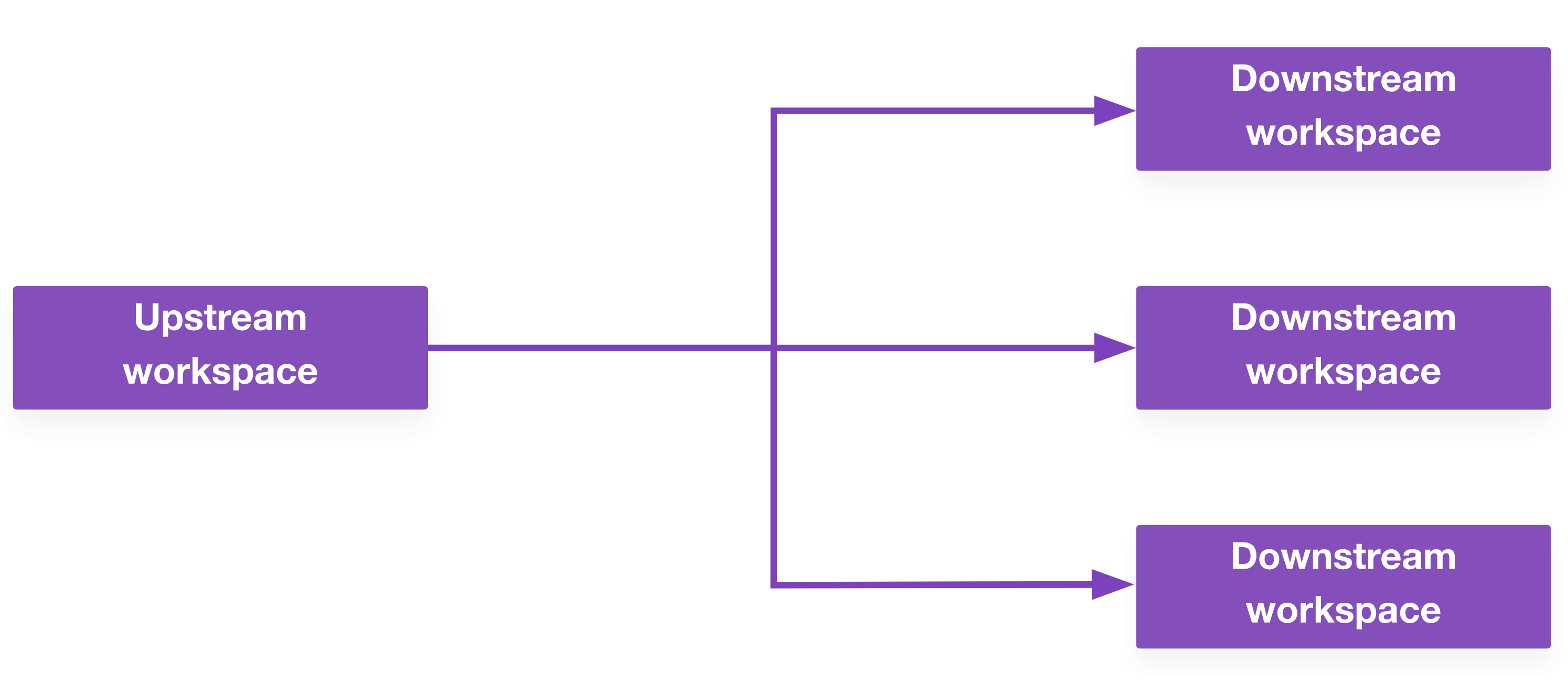
<p>Terraform Cloud has a feature called <a href="https://developer.hashicorp.com/terraform/cloud-docs/workspaces/settings/run-triggers">run triggers</a>. This allows you to kick off an <em>apply</em> on your compute workspace after your virtual network has been created. You can also define a one-to-many relationship here, where the successful apply on one upstream workspace triggers multiple downstream workspaces.</p>

<p><img src="/images/posts/2023-07-10/multispace_blog-d1-1-up-many-down.png" alt="no alt text" /></p>

<p>This alone solves some dependency challenges and is great for simple workflows. If it works for your use case, you should use it.</p>

<p>However, it doesn’t address all situations, which is why Mitchell Hashimoto created the <a href="https://registry.terraform.io/providers/mitchellh/multispace/latest/docs">multispace provider</a> to handle the kind of cascading creation/destruction workflows that can’t be done with simple run triggers. His example use case involves creating a Kubernetes stack: first you create the underlying virtual machines, then the core kubernetes services, DNS, and ingress. Each of these is its own separate workspace.</p>

<p>This initial implementation has since been refined and incorporated into the official Terraform Cloud/Enterprise provider (also called the “TFE provider”) in the form of the <a href="https://registry.terraform.io/providers/hashicorp/tfe/latest/docs/resources/workspace_run"><code class="language-plaintext highlighter-rouge">tfe_workspace_run</code></a> resource.</p>

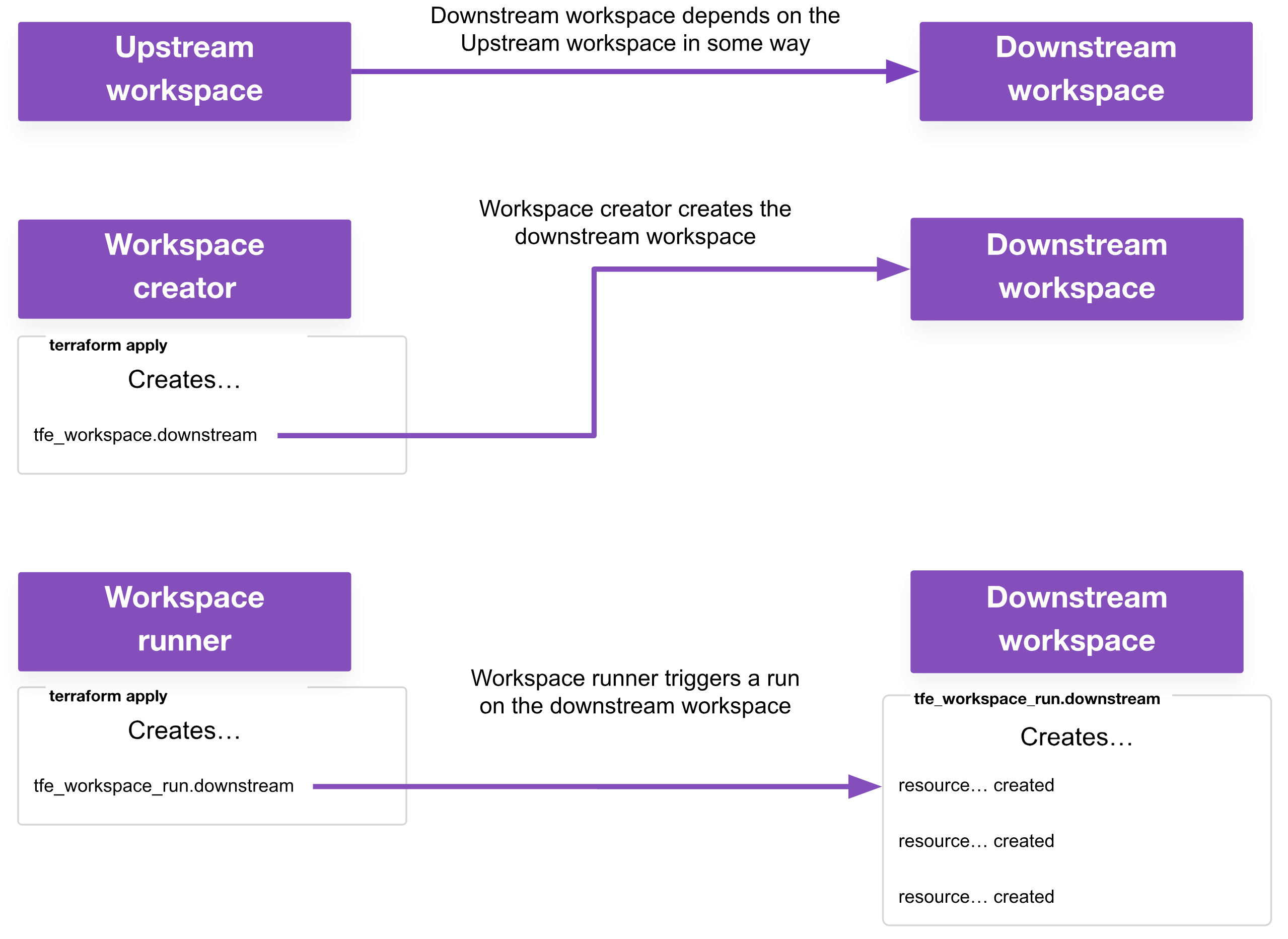
<p>For clarity, this post uses the following terminology when referring to the roles a workspace could have in multi-workspace deployments (an individual workspace may have one or more of these roles):</p>

<ul>
  <li><strong>Upstream workspace:</strong> This is a workspace that must run first, and is depended upon in some way by a downstream workspace</li>
  <li><strong>Downstream workspace:</strong> This is a workspace that runs second, because it has some dependency on the upstream workspace</li>
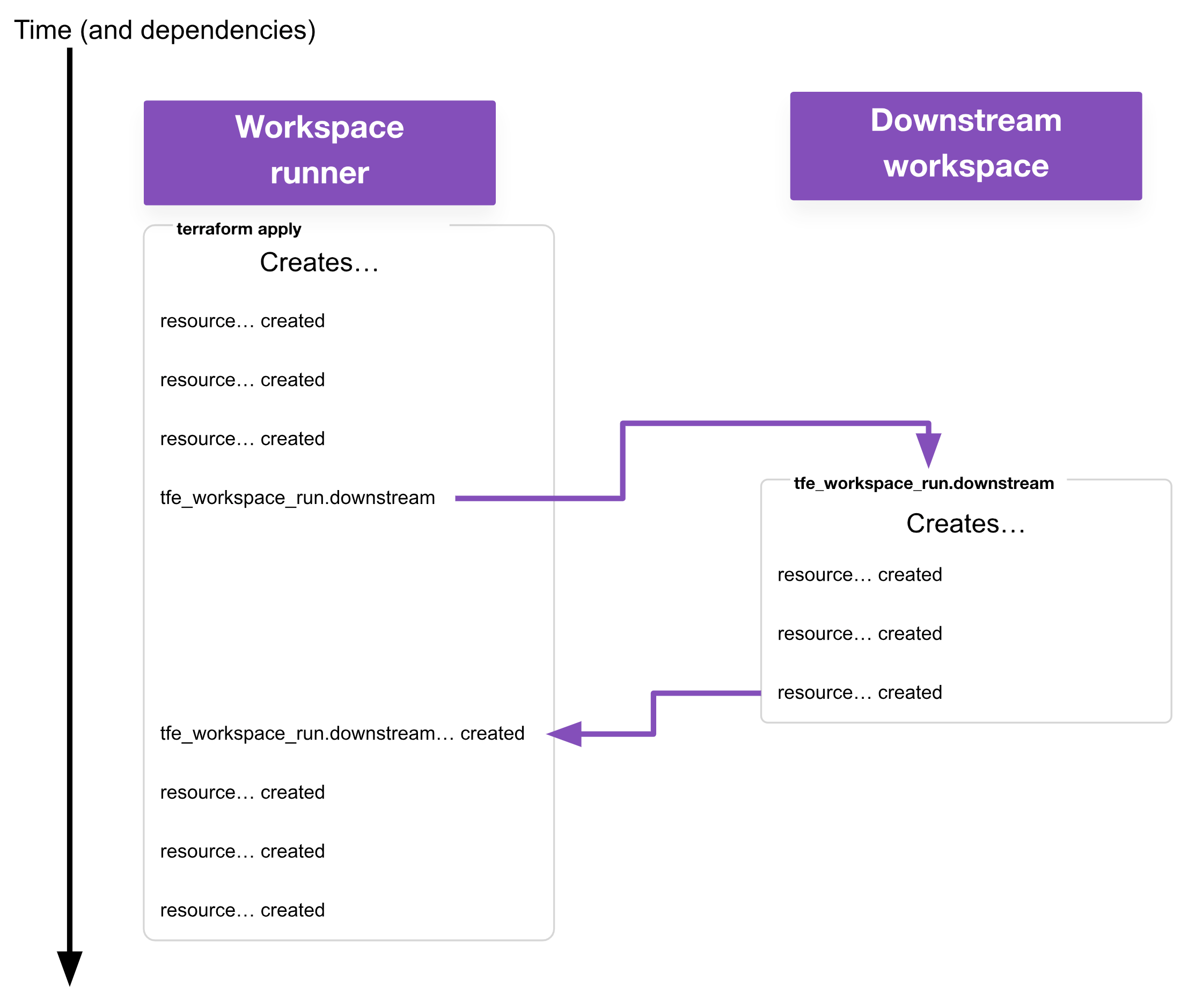
  <li><strong>Workspace runner:</strong> This is a workspace responsible for triggering runs on other workspaces with the <code class="language-plaintext highlighter-rouge">tfe_workspace_run</code> resource.</li>
  <li><strong>Workspace creator:</strong> This is a workspace responsible for creating other workspaces with the <code class="language-plaintext highlighter-rouge">tfe_workspace</code> resource. This is usually also a workspace runner in my use cases, but it may not be a requirement for yours.</li>
</ul>

<p><img src="/images/posts/2023-07-10/multispace_blog-d2-terminology.png" alt="no alt text" /></p>

<h3 id="applies">Applies</h3>

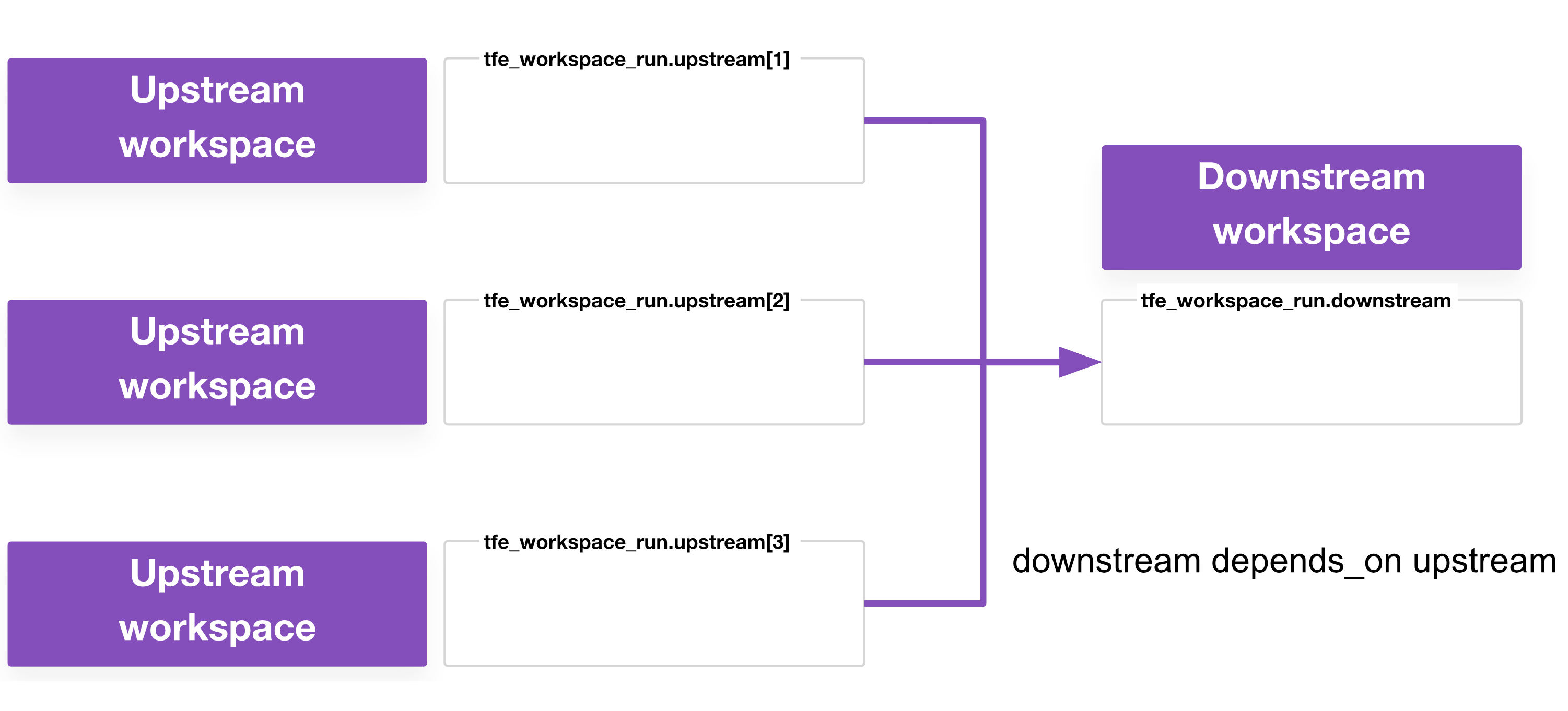
<p>Here’s an example of how run triggers and <code class="language-plaintext highlighter-rouge">tfe_workspace_run</code> differ: run triggers will always kick off a plan on the downstream workspace once the upstream workspace has completed a successful apply. Sometimes this results in plans on the downstream workspace that are unnecessary (in the case of a do-nothing plan) or that fail (when a downstream workspace has a dependency on multiple upstream workspaces but some upstream workspaces haven’t yet completed their apply phases).</p>

<p>With <code class="language-plaintext highlighter-rouge">tfe_workspace_run</code> you can specify when to apply and under what circumstance. For example, with <a href="https://developer.hashicorp.com/terraform/language/meta-arguments/depends_on"><code class="language-plaintext highlighter-rouge">depends_on</code></a>, a workspace runner could wait until several upstream workspaces have applied before kicking off the downstream workspace. If that is the only benefit relevant to you, chances are that run triggers are probably good enough for your use case; you’re probably fine with a do-nothing or failed plan every now and then.</p>

<p><img src="/images/posts/2023-07-10/multispace_blog-d3-many-up-1-down.png" alt="no alt text" /></p>

<p>You can use the <code class="language-plaintext highlighter-rouge">tfe_workspace_run</code> resource in two operational modes:</p>

<p><strong>Fire-and-forget</strong>: The resource simply queues a run on the downstream workspace and considers it good enough if the run was successfully queued. This mode is very similar to how run triggers work.</p>

<p><img src="/images/posts/2023-07-10/multispace_blog-d5-fire-forget.png" alt="no alt text" /></p>

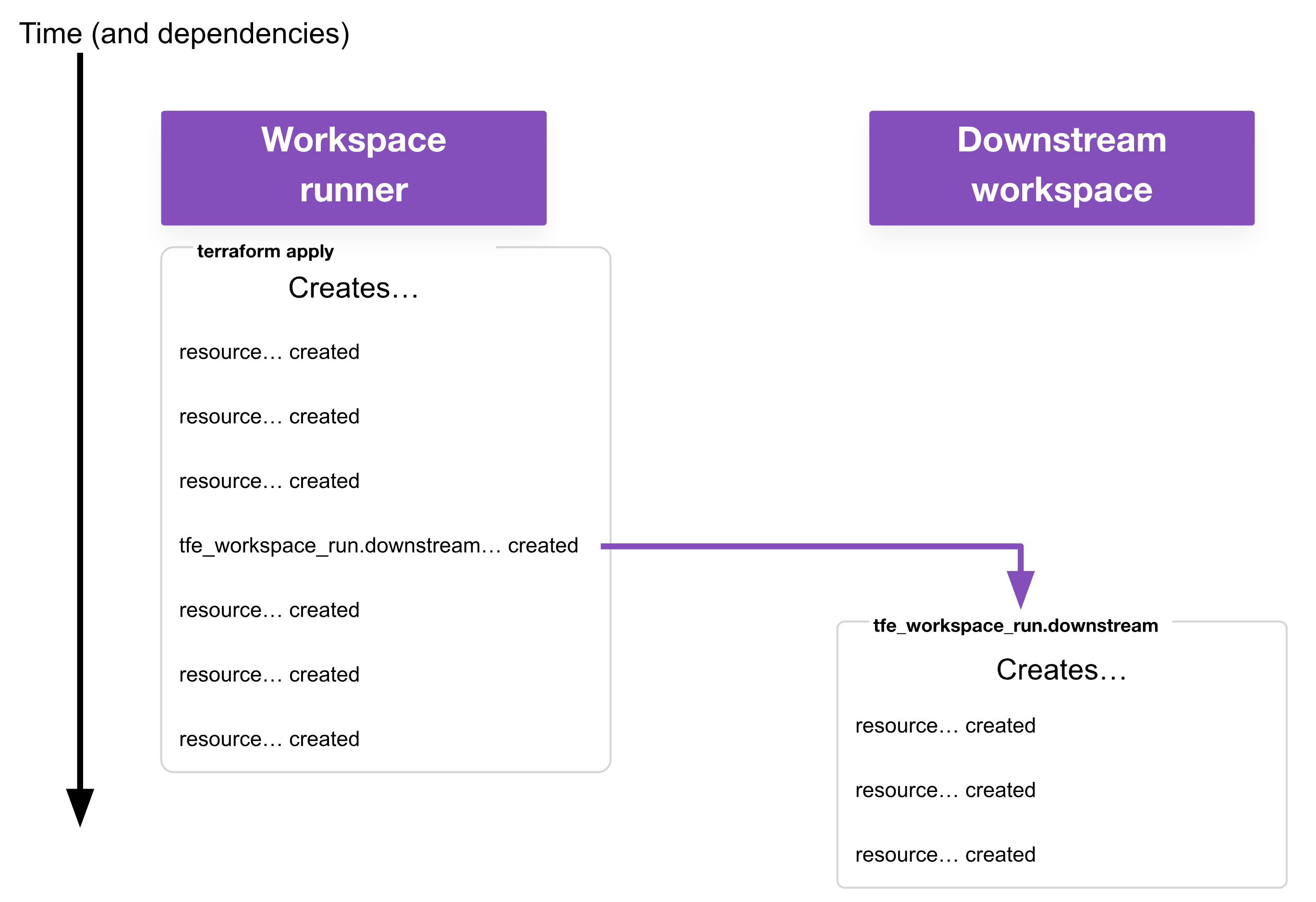
<p><strong>Wait</strong>: The resource queues a run on the downstream workspace and waits for it to successfully apply. After a successful plan, the resource can wait for a human approval on the apply or initiate the apply itself. Optionally, the resource can retry if the apply fails.</p>

<p><img src="/images/posts/2023-07-10/multispace_blog-d4-wait.png" alt="no alt text" /></p>

<h3 id="destroys">Destroys</h3>

<p>Run triggers do one thing: they trigger apply runs on downstream workspaces, and they do it only after the upstream has completed successfully. They do not handle destruction use cases. For example, you should destroy your compute before destroying your virtual network, and run triggers do not give you a means to model that side of the dependency.</p>

<p>This is where the real power of <code class="language-plaintext highlighter-rouge">tfe_workspace_run</code> comes in. The resource allows you to kick off a destroy on a downstream workspace and, if you’re using<code class="language-plaintext highlighter-rouge"> depends_on</code>, you can ensure that nothing in the upstream workspace is destroyed until the downstream workspace has successfully finished its destroy.</p>

<h3 id="apply-only-and-destroy-only">Apply-only and destroy-only</h3>

<p>While you can configure both the apply and destroy behavior for the downstream workspace, you don’t need to use both. There are cases where you only want to apply a downstream workspace. There are also times where you only want to destroy a downstream workspace, but you will trigger an apply yourself.</p>

<h2 id="tfe_workspace_run-in-action">tfe_workspace_run in action</h2>

<p>The <a href="https://registry.terraform.io/providers/hashicorp/tfe/latest/docs/resources/workspace_run"><code class="language-plaintext highlighter-rouge">tfe_workspace_run</code> resource</a> documentation on the Terraform Registry includes a few example code snippets to use as a starting point. At its most basic, the resource looks like this:</p>

<div class="language-plaintext highlighter-rouge"><div class="highlight"><pre class="highlight"><code>resource "tfe_workspace_run" "ws_run_parent" {
  workspace_id = "ws-fSX576JZGENVaeMi"
 
  apply {
    # tfe_workspace_run is responsible for approving the apply
    # part of the run
    # this is the only required argument in the apply{} and
    # destroy{} blocks
    manual_confirm    = false
 
    # if the run fails, try again, up to 3 times, waiting between
    # 1 and 30 seconds
    # this is the default behaviour, presented here for clarity
    wait_for_run      = true
    retry_attempts    = 3
    retry_backoff_min = 1
    retry_backoff_max = 30
  }
 
  destroy {
    manual_confirm    = false
  }
}
</code></pre></div></div>

<p>This example shows what’s meant by a <em>workspace runner</em>. For the specified workspace, our <code class="language-plaintext highlighter-rouge">tfe_workspace_run</code> resource will trigger an apply, wait for that to complete, then consider the <code class="language-plaintext highlighter-rouge">tfe_workspace_run</code> successfully created. On destroy, the <code class="language-plaintext highlighter-rouge">tfe_workspace_run</code> will trigger a destroy, wait for that to complete, then consider the <code class="language-plaintext highlighter-rouge">tfe_workspace_run</code> successfully destroyed.</p>

<p>Because we are using the TFE provider, the workspace runner requires a <code class="language-plaintext highlighter-rouge">TFE_TOKEN</code> with sufficient permissions to kick off plan/apply/destroy runs on child workspaces. (You may wish to use the <a href="https://developer.hashicorp.com/vault/tutorials/secrets-management/terraform-secrets-engine">Terraform Cloud secrets engine</a> in HashiCorp Vault to generate these, but that is out-of-scope for this blog post.)</p>

<p>Beyond the basic examples, this post will present a few patterns with example configuration for how to use this resource.</p>

<h2 id="apply-fire-and-forget-and-destroy-wait">Apply (fire and forget) and destroy (wait)</h2>

<p>The <code class="language-plaintext highlighter-rouge">tfe_workspace_run</code> resource is most useful when creating new workspaces. This example uses the TFE provider to create a workspace, set up all the necessary permissions, and configure the <a href="https://developer.hashicorp.com/terraform/tutorials/cloud/dynamic-credentials">dynamic credentials</a>. All of that must be done before the workspace can be applied.</p>

<p>As a reminder, the term “workspace creator” refers to any workspace responsible for creating other workspaces and related resources. In most cases when using a workspace creator, it will also be a workspace runner for the workspaces it creates (i.e. it is responsible for triggering apply and/or destroy runs on those workspaces).</p>

<div class="language-plaintext highlighter-rouge"><div class="highlight"><pre class="highlight"><code>resource "tfe_workspace_run" "downstream" {
  workspace_id = tfe_workspace.downstream.id
 
  # depends_on = creds and other workspace dependencies go here
 
  apply {
    # Fire and Forget
    wait_for_run = false
    # auto-apply
    manual_confirm = false
  }
 
  destroy {
    # Wait for destroy before doing anything else
    wait_for_run = true
    # auto-apply
    manual_confirm = false
  }
}
</code></pre></div></div>

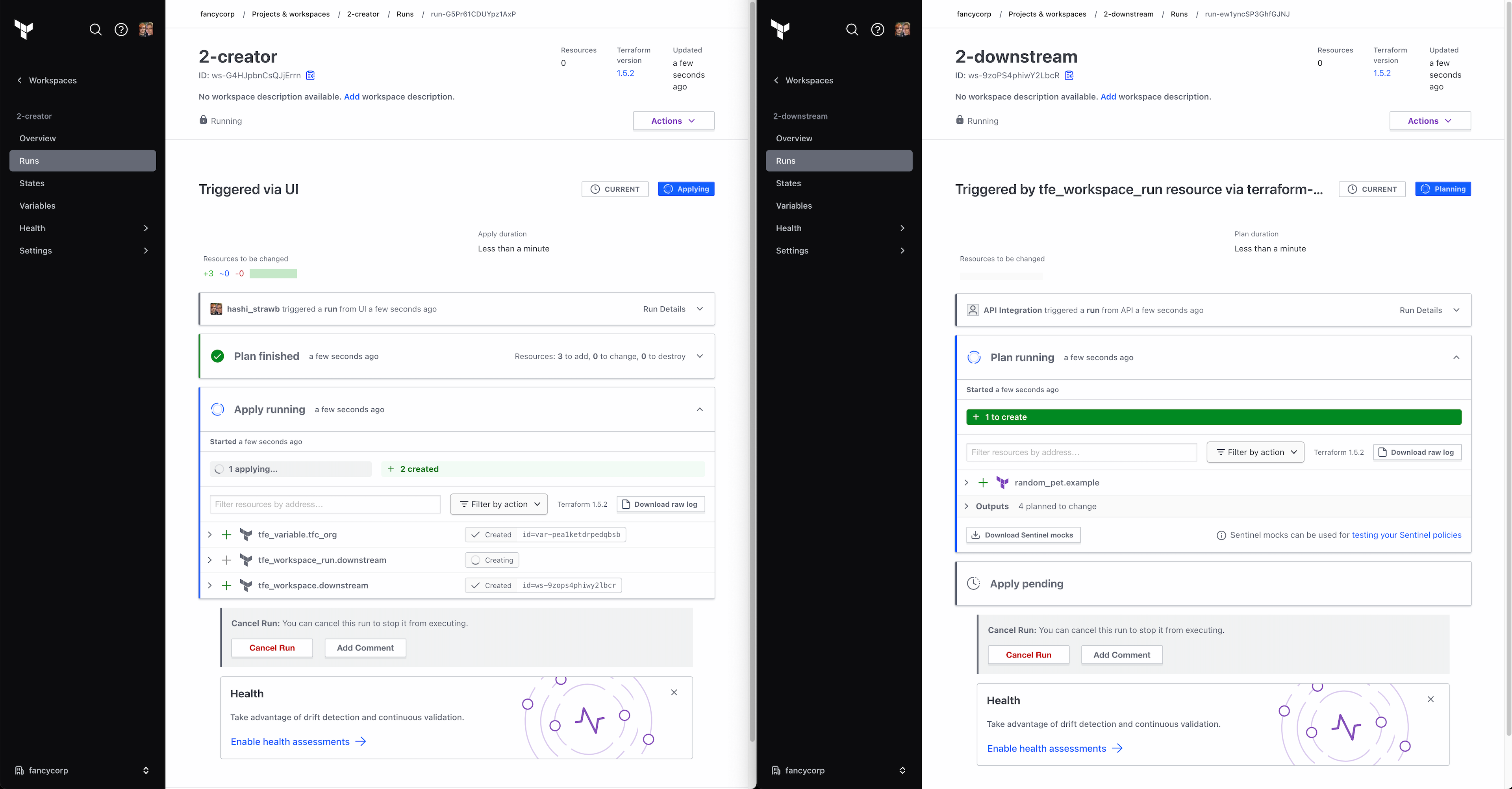
<p>From the perspective of the workspace runner, it doesn’t need to care if the downstream workspace was successfully applied, just that an apply was attempted. This functionality alone is achievable with run triggers (and in this fire-and-forget mode, the behavior is very similar), but as this example is already using <code class="language-plaintext highlighter-rouge">tfe_workspace_run</code> to handle the destroy, it makes sense to use it for the apply as well.</p>

<p><img src="/images/posts/2023-07-10/multispace_blog-s1-apply.png" alt="no alt text" /></p>

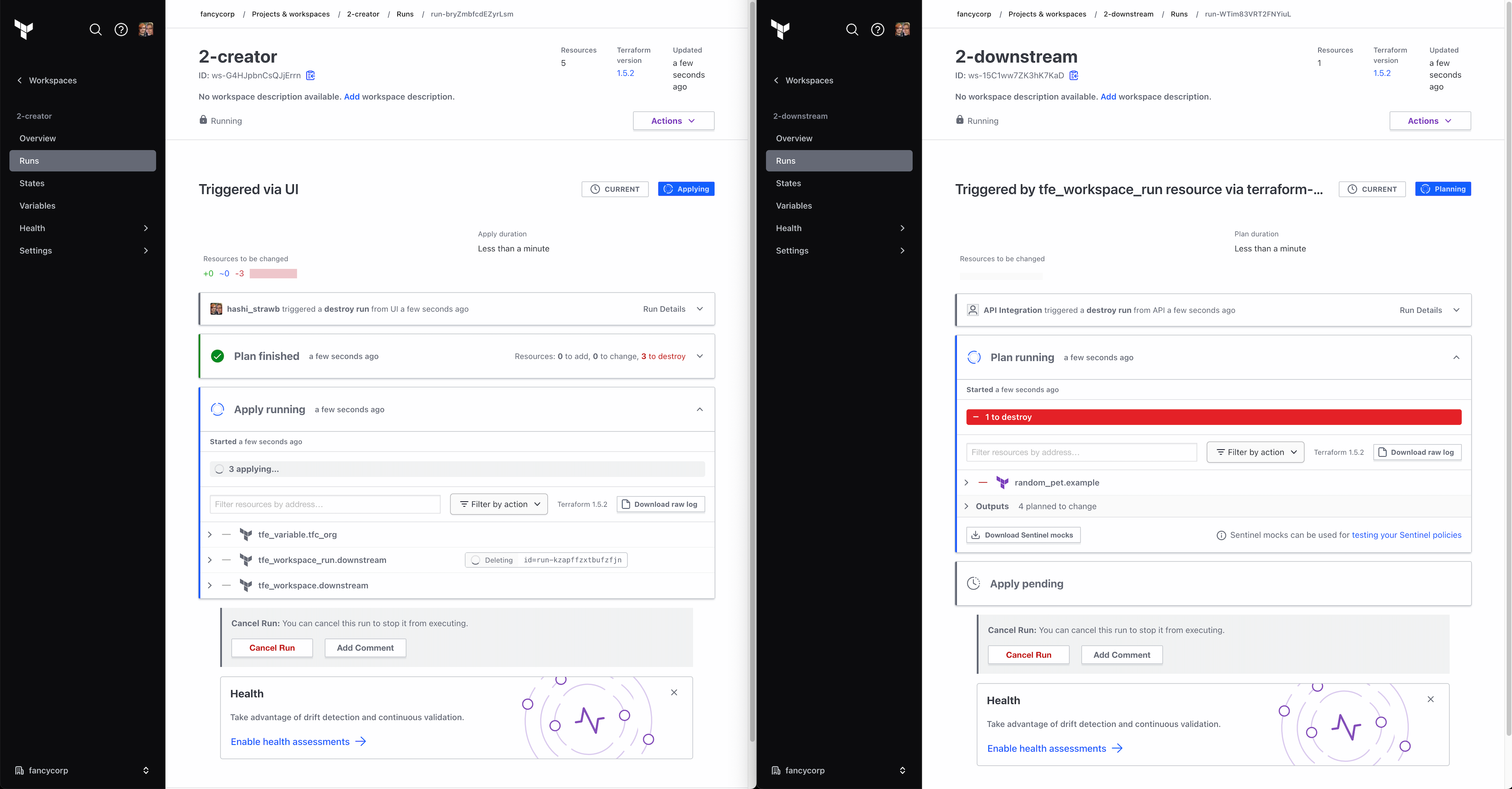
<p>By including the <code class="language-plaintext highlighter-rouge">destroy{}</code> block in combination with <code class="language-plaintext highlighter-rouge">depends_on</code>, you can ensure that the workspace and supporting resources remain untouched until the downstream workspace has successfully destroyed all the resources it manages.</p>

<p>If you do not include a <code class="language-plaintext highlighter-rouge">destroy{}</code> block, then attempting to delete the downstream workspace will result in an error like this:</p>

<p><code class="language-plaintext highlighter-rouge">Error: error deleting workspace ws-BxxKPnyBVpxwVQB1: This
workspace has 4 resources under management and must be force
deleted by setting force_delete = true</code></p>

<p>If you do not include the <code class="language-plaintext highlighter-rouge">depends_on</code>, then dependencies such as variables and credentials that the downstream workspace needs will end up getting deleted too early.</p>

<p><img src="/images/posts/2023-07-10/multispace_blog-s2-destroy.png" alt="no alt text" /></p>

<p>The upcoming <a href="https://www.hashicorp.com/blog/new-terraform-cloud-capabilities-to-import-view-and-manage-infrastructure">ephemeral workspaces</a> will ensure the entire stack of workspaces is safely destroyed in the correct order once the ephemeral workspace hits its time-to-live (TTL).</p>

<h2 id="destroy-only-workflows">Destroy-only workflows</h2>

<p>This is a pattern I use extensively in my workspace creator. As a reminder, this is a “workspace runner” (i.e. a workspace which triggers runs on other workspaces). In my case, when creating a new workspace, I don’t necessarily want it to try to apply immediately, so my configuration looks like this:</p>

<div class="language-plaintext highlighter-rouge"><div class="highlight"><pre class="highlight"><code>resource "tfe_workspace_run" "downstream" {
  workspace_id = tfe_workspace.downstream.id
 
  # depends_on = creds and other workspace dependencies go here
 
  destroy {
    wait_for_run = true
    manual_confirm = false
  }
}
</code></pre></div></div>

<p>The only difference between this and the previous example is the absence of the <code class="language-plaintext highlighter-rouge">apply{}</code> block. This means that when doing an apply on the workspace runner, Terraform will create a placeholder resource referencing a non-existent apply on the downstream workspace. This may seem pointless as nothing has actually been done yet, but the presence of this resource in Terraform state signals to Terraform that, when it comes time to destroy the workspace runner, it should first kick off a destroy on the downstream workspace.</p>

<p>Similarly, you can also have an apply-only workflow by including an <code class="language-plaintext highlighter-rouge">apply{}</code> block but no <code class="language-plaintext highlighter-rouge">destroy{}</code>. For most use cases, an <code class="language-plaintext highlighter-rouge">apply{}</code> block with no <code class="language-plaintext highlighter-rouge">destroy{}</code> block is practically identical to just using run triggers.  If it is, then just use run triggers. But for some niche use-cases, you may want to conditionally apply, which run triggers does not allow you to do.</p>

<h2 id="what-if-there-are-more-than-two-workspaces">What if there are more than two workspaces?</h2>

<p>This is the main reason for the concept of a workspace runner separate from the idea of an upstream workspace. The previous examples have a single upstream workspace for every downstream workspace. In cases like that, introducing an additional workspace runner just adds unnecessary complexity; the upstream can handle the runner functionality.</p>

<p>Workspace runners become useful in cases where there are more than two workspaces. While upstream workspaces can handle the runner role functionally, if you have apply or destroy runs configured to wait for completion, then you’ll have more workspaces in your stack, which results in more concurrent runs. If you have too many, the queue will fill up, and you’ll end up in a deadlock, where downstream workspaces are queued but can never begin, and upstream workspaces are waiting on those downstream workspace runs.</p>

<p>By introducing a separate workspace runner, you can ensure you need to consume only two concurrency slots: one for the runner, and one for whichever other workspace it is currently running.</p>

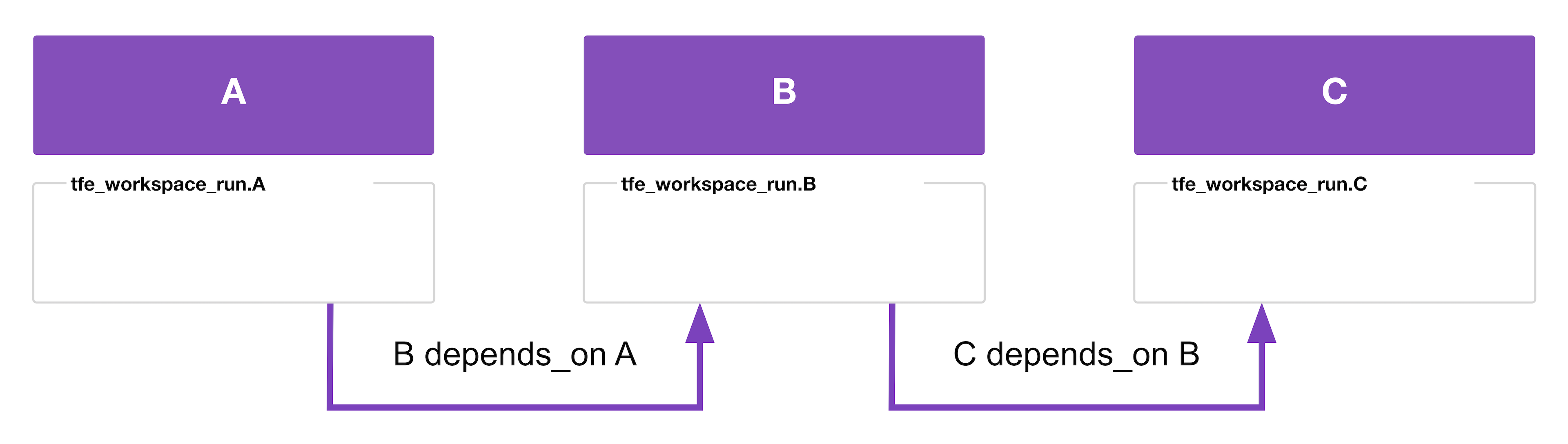
<p>Some examples, first a simple one, then a complex one:</p>

<p><img src="/images/posts/2023-07-10/multispace_blog-d6-chain.png" alt="no alt text" /></p>

<div class="language-plaintext highlighter-rouge"><div class="highlight"><pre class="highlight"><code>resource "tfe_workspace_run" "A" {
  workspace_id = data.tfe_workspace.ws["A"].id
 
  apply {
    wait_for_run   = true
    manual_confirm = false
  }
 
  destroy {
    wait_for_run   = true
    manual_confirm = false
  }
}
 
resource "tfe_workspace_run" "B" {
  workspace_id = data.tfe_workspace.ws["B"].id
 
  depends_on = [tfe_workspace_run.A]
 
  apply {
    wait_for_run   = true
    manual_confirm = false
  }
 
  destroy {
    wait_for_run   = true
    manual_confirm = false
  }
}
 
resource "tfe_workspace_run" "C" {
  workspace_id = data.tfe_workspace.ws["C"].id
 
  depends_on = [tfe_workspace_run.B]
 
  apply {
    wait_for_run   = true
    manual_confirm = false
  }
 
  destroy {
    wait_for_run   = true
    manual_confirm = false
  }
}
</code></pre></div></div>

<ul>
  <li>In this example, to apply, the workspace runner queues a run on A, waits for it to complete, queues a run on B, waits for it to complete, then queues a run on C.</li>
  <li>If you care only about the apply phase, this is a perfect use case for run triggers.</li>
  <li>To destroy, the workspace runner queues a run on C first, then B, then A.</li>
</ul>

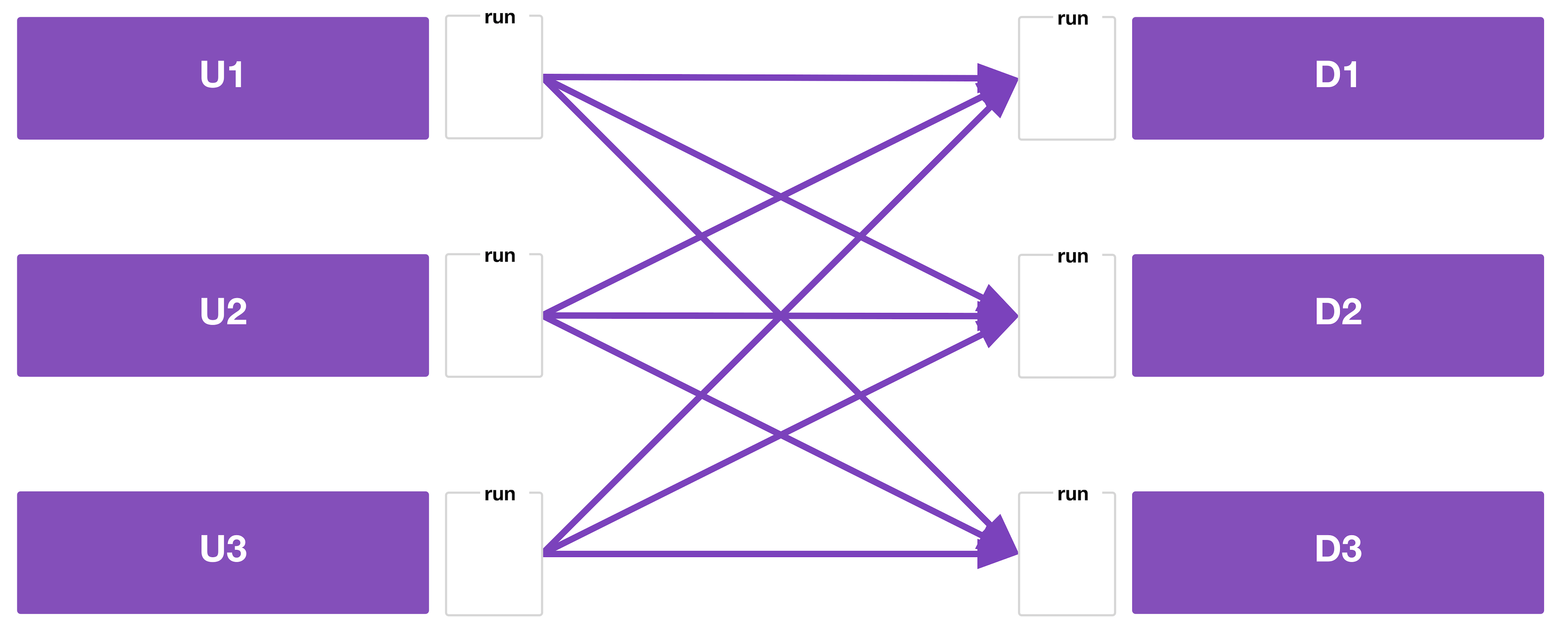
<p>Of course, there’s no reason you’re limited to each workspace having one upstream or one downstream. You may have a complex web of dependencies between your workspaces. Here’s as example (with the code in the repo linked at the end of the post):</p>

<p><img src="/images/posts/2023-07-10/multispace_blog-d7-mesh.png" alt="no alt text" /></p>

<ul>
  <li>Whether or not there’s an actual real-world use case for this precise graph of workspace dependencies, it serves as a good example of the complexity you can end up with.</li>
  <li>In this example, the workspace runner queues runs on U1, U2, and U3.</li>
  <li>If there are spare concurrency slots, all three will run concurrently. If not, at least one will wait in the queue.</li>
  <li>Once all three have finished, then the workspace runner queues runs on D1, D2, and D3.</li>
  <li>Again, if you just care about the apply phase, run triggers would work, but you would get a lot of failed plans because U1, U2, and U3 finish at different times.</li>
  <li>To destroy, the workspace runner queues a run on D1, D2, and D3 first, then U1, U2, and U3.</li>
</ul>

<h1 id="summary">Summary</h1>

<p>The resource required to power this workflow is now an official, supported part of the TFE provider. As more people make use of <code class="language-plaintext highlighter-rouge">tfe_workspace_run</code> and give feedback, HashiCorp can continue to improve the resource.</p>

<p>If you aren’t already using Terraform Cloud, you’ll want to experiment with that first. Start for free by <a href="https://app.terraform.io/public/signup/account">signing up for an account</a>.</p>

<p>Please note that to avoid hitting concurrency limits on the Free tier of Terraform Cloud, you can:</p>

<ul>
  <li>Use only run triggers or <code class="language-plaintext highlighter-rouge">tfe_workspace_run</code> in fire-and-forget mode, or</li>
  <li>Ensure the workspace runner is running in local mode if you plan to use <code class="language-plaintext highlighter-rouge">tfe_workspace_run</code> in wait mode, or</li>
  <li>Upgrade to a paid subscription to increase your concurrency limits.</li>
</ul>

<p>If you are an existing Terraform Cloud user, then experiment with these patterns. Regardless of whether you’re using run triggers or <code class="language-plaintext highlighter-rouge">tfe_workspace_run</code>, automating the dependencies between workspaces will save you time and effort.</p>

<p>As mentioned at the beginning of the post, you can find these code examples in <a href="https://github.com/hashi-strawb/multispace-example">this GitHub repository</a>.</p>]]></content><author><name>Lucy Davinhart</name></author><category term="tech" /><category term="terraform" /><category term="terraform cloud" /><category term="crosspost" /><summary type="html"><![CDATA[How I use the Terraform Cloud/Enterprise provider to coordinate applies and destroys on downstream workspaces in Terraform Cloud]]></summary></entry><entry><title type="html">Adventures in Dynamic Terraform</title><link href="http://lmhd.me/tech/2021/05/26/dynamic-terraform/" rel="alternate" type="text/html" title="Adventures in Dynamic Terraform" /><published>2021-05-26T18:45:00+01:00</published><updated>2021-05-26T18:45:00+01:00</updated><id>http://lmhd.me/tech/2021/05/26/dynamic-terraform</id><content type="html" xml:base="http://lmhd.me/tech/2021/05/26/dynamic-terraform/"><![CDATA[<p>So what if I didn’t need to write Terraform code?</p>

<!--more-->

<h1 id="in-the-beginning">In the beginning…</h1>

<p>So this whole story starts with me looking to manage my DNS records better.</p>

<p>I wrote a whole blog post about it if you’re interested: <a href="/tech/2017/04/02/dns-under-one-roof/">Moving my DNS records to Route 53 with Terraform</a></p>

<p>I was modifying them by hand in our domain registrar’s own DNS settings page… and it was kinda a pain.</p>

<p>At work we use AWS Route 53 for some DNS records, so I was familiar with how that worked, and it seemed like a good idea to move to that too. Not because managing DNS records in Route 53 by hand is much easier, but it opened up the possibility for automating it.</p>

<h1 id="terraform">Terraform!</h1>

<p>Which is where Terraform comes in!</p>

<p>Before we can create some DNS records, we need a <a href="https://registry.terraform.io/providers/hashicorp/aws/latest/docs/resources/route53_zone">hosted zone</a></p>

<p>It’s prety simple to create one. Just needs a name:</p>

<div class="language-plaintext highlighter-rouge"><div class="highlight"><pre class="highlight"><code>resource "aws_route53_zone" "lmhd-me" {
  name = "lmhd.me"
}
</code></pre></div></div>

<p>I will want to delegate the test subdomain to a different zone too:</p>

<div class="language-plaintext highlighter-rouge"><div class="highlight"><pre class="highlight"><code>resource "aws_route53_record" "lmhd-me_NS_test-lmhd-me" {
  zone_id = aws_route53_zone.lmhd-me.zone_id
  name    = "test.lmhd.me"
  type    = "NS"
  ttl     = "300"

  records = aws_route53_zone.test-lmhd-me.name_servers
}
</code></pre></div></div>

<p>I don’t <em>need</em> to do that, but I like that separation, and it gives me the flexibilty to move that to an entirely different AWS account (or somewhere else) in future.</p>

<p>The first problem I encounted almost immediately was that you can’t do CNAMEs on apex domains, and I wanted to do something for <a href="https://lmhd.me">lmhd.me</a>.</p>

<p>Route 53 doesn’t have a concept of an “ANAME”. So I would have to roll my own.</p>

<p>Thankfully, Terraform has a <a href="https://registry.terraform.io/providers/hashicorp/dns/latest">DNS Provider</a> so I could query for the IP Address of my Netlify site, and then use that when defining my A Record for <code class="language-plaintext highlighter-rouge">lmhd.me</code>:</p>

<div class="language-plaintext highlighter-rouge"><div class="highlight"><pre class="highlight"><code># Lookup CNAME for Netlify.
data "dns_cname_record_set" "lmhd-dot-me-netlify-com" {
  host = "lmhd-dot-me.netlify.com"
}

# Get IPs for that CNAME
data "dns_a_record_set" "netlify-com" {
  host = data.dns_cname_record_set.lmhd-dot-me-netlify-com.cname
}

# Set up the A record for lmhd.me
resource "aws_route53_record" "lmhd-me-A-record" {
  zone_id = aws_route53_zone.lmhd-me.zone_id
  name    = "lmhd.me"
  type    = "A"
  ttl     = "300"

  records = ["${data.dns_a_record_set.netlify-com.addrs}"]
}
</code></pre></div></div>

<p>The rest of the records are fairly simple. Most are just CNAMEs, and have similar format to the above.</p>

<p>I set this up to run in <a href="https://www.terraform.io/cloud">Terraform Cloud</a>, and away I went, adding new DNS records as and when I needed them. For example:</p>

<div class="language-plaintext highlighter-rouge"><div class="highlight"><pre class="highlight"><code>resource "aws_route53_record" "widgets-lmhd-me-CNAME-record" {
  zone_id = aws_route53_zone.lmhd-me.zone_id
  name    = "widgets.lmhd.me"
  type    = "CNAME"
  ttl     = "300"

  records = ["lmhd-widgets.netlify.app"]
}
</code></pre></div></div>

<h1 id="okay-this-is-getting-tedious">Okay, this is getting tedious</h1>

<p>I’m <del>lazy</del> efficient, so I don’t want to have to write out all of that every time I want to add something.</p>

<p>Can we make it easier on ourselves?</p>

<p>What if we make TF Variables out of this?</p>

<p>Took a bit of fiddling to get something which works, but here’s what I came up with as my initial version:</p>

<div class="language-plaintext highlighter-rouge"><div class="highlight"><pre class="highlight"><code>#
# DNS Records
#

variable "lmhd_records" {
  type = map(object({
    type    = string
    ttl     = string
    records = list(string)
  }))
  default = {
    "widgets.lmhd.me" = {
      type    = "CNAME"
      ttl     = "300"
      records = ["lmhd-widgets.netlify.app"]
    }
  }
}

#
# DNS Records
#

resource "aws_route53_record" "lmhd_record" {
  for_each = var.lmhd_records
  zone_id  = aws_route53_zone.lmhd-me.zone_id
  name     = each.key
  type     = each.value.type
  ttl      = each.value.ttl
  records  = each.value.records
}
</code></pre></div></div>

<p>This makes use of Terraform’s <a href="https://www.terraform.io/docs/language/meta-arguments/for_each.html">for_each</a> Meta-Argument, so rather than defining a Terraform resource for every DNS record, I define a single resource and update the variable instead.</p>

<p>And our plan looks like this:</p>

<div class="language-plaintext highlighter-rouge"><div class="highlight"><pre class="highlight"><code>  # aws_route53_record.lmhd_record["widgets.lmhd.me"] will be created
  + resource "aws_route53_record" "lmhd_record" {
      + allow_overwrite = (known after apply)
      + fqdn            = (known after apply)
      + id              = (known after apply)
      + name            = "widgets.lmhd.me"
      + records         = [
          + "lmhd-widgets.netlify.app",
        ]
      + ttl             = 300
      + type            = "CNAME"
      + zone_id         = "REDACTED"
    }
</code></pre></div></div>

<p>That’s… okay. Maybe slightly less typing… but now it’s messy. Why would I want to do this?</p>

<p>And if I stopped there, I would agree, it’s not really worth it.</p>

<p>But it is a stepping stone in the right direction: getting automatically generated TF code!</p>

<h1 id="auto-generated-tf-code">Auto-generated TF code</h1>

<p>Can I use external files to auto-generate my Terraform code?</p>

<p>And… yes. Terraform has a bunch of functions, including <a href="https://www.terraform.io/docs/language/functions/fileset.html">fileset</a> which lets me query the content of a directory.</p>

<p>First we need to pull in some files…</p>

<div class="language-plaintext highlighter-rouge"><div class="highlight"><pre class="highlight"><code>locals {
  lmhd_records_files = fileset(path.module, "lmhd.me/*.json")
}

output "lmhd_records" {
  value = local.lmhd_records_files
}

</code></pre></div></div>

<p>This gives us a list of all JSON files in the <code class="language-plaintext highlighter-rouge">lmhd.me/</code> directory:</p>

<div class="language-plaintext highlighter-rouge"><div class="highlight"><pre class="highlight"><code>Changes to Outputs:
  + lmhd_records = [
      + "lmhd.me/widgets.lmhd.me.json",
    ]
</code></pre></div></div>

<p>So that’s a start.</p>

<p>That one JSON file of mine looks like this:</p>

<div class="language-plaintext highlighter-rouge"><div class="highlight"><pre class="highlight"><code>{
  "type": "CNAME",
  "ttl": "300",
  "records": [
    "lmhd-widgets.netlify.app"
  ]
}
</code></pre></div></div>

<p>And we can pull that in with Terraform making use of a few other functions:</p>

<div class="language-plaintext highlighter-rouge"><div class="highlight"><pre class="highlight"><code>resource "aws_route53_record" "lmhd_record" {
  for_each = local.lmhd_records_files
  zone_id  = aws_route53_zone.lmhd-me.zone_id

  # Use the filename as the name of the DNS record
  # e.g. lmhd.me/widgets.lmhd.me.json --&gt; widgets.lmhd.me
  name     = trimsuffix(basename(each.key), ".json")

  # Get the rest of the values from keys in the JSON file
  type     = jsondecode(file(each.key))["type"]
  ttl      = jsondecode(file(each.key))["ttl"]
  records  = jsondecode(file(each.key))["records"]
}
</code></pre></div></div>

<p>Our plan looks like this:</p>

<div class="language-plaintext highlighter-rouge"><div class="highlight"><pre class="highlight"><code>  # aws_route53_record.lmhd_record["lmhd.me/widgets.lmhd.me.json"] will be created
  + resource "aws_route53_record" "lmhd_record" {
      + allow_overwrite = (known after apply)
      + fqdn            = (known after apply)
      + id              = (known after apply)
      + name            = "widgets.lmhd.me"
      + records         = [
          + "lmhd-widgets.netlify.app",
        ]
      + ttl             = 300
      + type            = "CNAME"
      + zone_id         = "REDACTED"
    }
</code></pre></div></div>

<p>Looking good 🙂</p>

<h1 id="but-i-like-yaml-">But… I like YAML… 👉👈</h1>

<p>Okay, fine…</p>

<p>Our <code class="language-plaintext highlighter-rouge">widgets.lmhd.me.yaml</code> file:</p>

<div class="language-plaintext highlighter-rouge"><div class="highlight"><pre class="highlight"><code>type: CNAME
ttl: 300
records:
- lmhd-widgets.netlify.app
</code></pre></div></div>

<div class="language-plaintext highlighter-rouge"><div class="highlight"><pre class="highlight"><code>locals {
  lmhd_records_files = fileset(path.module, "lmhd.me/*.yaml")
}

resource "aws_route53_record" "lmhd_record" {
  for_each = local.lmhd_records_files
  zone_id  = aws_route53_zone.lmhd-me.zone_id

  # Use the filename as the name of the DNS record
  # e.g. lmhd.me/widgets.lmhd.me.json --&gt; widgets.lmhd.me
  name     = trimsuffix(basename(each.key), ".yaml")

  # Get the rest of the values from keys in the YAML file
  type     = yamldecode(file(each.key))["type"]
  ttl      = yamldecode(file(each.key))["ttl"]
  records  = yamldecode(file(each.key))["records"]
}
</code></pre></div></div>

<p>Happy?</p>

<h1 id="some-validation">Some validation</h1>

<p>That works fine as an initial Proof of Concept… but what if I’ve not specified some of those keys in my file?</p>

<p>In my case, most of these values are going to be the same.</p>

<p>I’m primarily defining CNAMEs, and I rarely change the TTL.</p>

<p>So I kinda don’t really want to have to specify them in my files every time.</p>

<p>Can we do something about that?</p>

<p>And… yes we can.</p>

<p>Let’s have a YAML file like this:</p>

<div class="language-plaintext highlighter-rouge"><div class="highlight"><pre class="highlight"><code>records:
- lmhd-widgets.netlify.app
</code></pre></div></div>

<p>And some Terraform code like this:</p>

<div class="language-plaintext highlighter-rouge"><div class="highlight"><pre class="highlight"><code>variable "default_ttl" {
  type    = string
  default = "300"
}

resource "aws_route53_record" "lmhd_record" {
  for_each = local.lmhd_records_files
  zone_id  = aws_route53_zone.lmhd-me.zone_id

  # Use the "name" key if specified
  # otherwise fallback to filename, minus .yaml
  name = lookup(
    yamldecode(file(each.key)),
    "name",
    trimsuffix(basename(each.key), ".yaml")
  )

  # Default to CNAME type unless told otherwise
  type = lookup(
    yamldecode(file(each.key)),
    "type",
    "CNAME"
  )

  # Use Default TTL unless told otherwise
  ttl = lookup(
    yamldecode(file(each.key)),
    "ttl",
    var.default_ttl
  )

  # We must have some records, otherwise this will fail
  records = yamldecode(file(each.key))["records"]
}
</code></pre></div></div>

<p>Now, if I do not specify some of those values, it will use the defaults.</p>

<p>I can also override the name of the DNS record if I so chose.</p>

<p>That last bit, if we do not specify any records in our YAML file, Terraform spits out the following error message:</p>

<div class="language-plaintext highlighter-rouge"><div class="highlight"><pre class="highlight"><code>╷
│ Error: Invalid index
│
│   on lmhd.me.tf line 348, in resource "aws_route53_record" "lmhd_record":
│  348:   records = yamldecode(file(each.key))["records"]
│     ├────────────────
│     │ each.key is "lmhd.me/widgets.lmhd.me.yaml"
│
│ The given key does not identify an element in this collection value.
</code></pre></div></div>

<p>Which is okay. You can figure out what’s gone wrong there.</p>

<p>We can’t add custom error messages, because we can’t use <a href="https://www.terraform.io/docs/language/values/variables.html#custom-validation-rules">validation blocks</a>, as those don’t exist for resources, only variables.</p>

<h1 id="great-but-why">Great! But… Why?</h1>

<p>I mean, why go through all this effort, when you could just write the Terraform code?</p>

<p>What’s wrong with this?</p>

<div class="language-plaintext highlighter-rouge"><div class="highlight"><pre class="highlight"><code>resource "aws_route53_record" "widgets-lmhd-me-CNAME-record" {
  zone_id = aws_route53_zone.lmhd-me.zone_id
  name    = "widgets.lmhd.me"
  type    = "CNAME"
  ttl     = "300"

  records = ["lmhd-widgets.netlify.app."]
}
</code></pre></div></div>

<p>And besides the obvious answer of “I’m doing this because it’s fun…</p>

<p>It actually does have some valid use-cases.</p>

<p>A couple years ago I did a talk at HashiConf about how we generate Terraform code for our Vault configuration.</p>

<p>You can watch it here later:</p>

<iframe width="560" height="315" src="https://www.youtube-nocookie.com/embed/vD3_jeqGx6M" title="YouTube video player" frameborder="0" allow="accelerometer; autoplay; clipboard-write; encrypted-media; gyroscope; picture-in-picture" allowfullscreen=""></iframe>

<p>The short version though… our pipeline generates Terraform code. So for example, if a user wants to add a new policy, they don’t worry about writing the Terraform code for that, they just raise a Pull Request which contains the policy itself, and our pipeline figures out the rest.</p>

<p>That was originally done with some bash scripts… which it turns out, once we had several hundred, was pretty slow.</p>

<p>So we rewrote it in Go and now it’s faster.</p>

<p>But what if we didn’t need any external tools in the first place?</p>

<p>What if we could just have Terraform do all the hard work?</p>

<p>That’s how I’ve been approaching Terraforming my own personal Vault.</p>

<p>So let’s see if I can improve that with some sort of dynamic Terraform like we’ve seen above.</p>

<h1 id="vault-terraform-20">Vault Terraform 2.0</h1>

<p>Let’s start with policies, as those are the easiest to conceptualise.</p>

<p>It’s just one file, and you want the content of each of those files to become policies in Vault.</p>

<div class="language-plaintext highlighter-rouge"><div class="highlight"><pre class="highlight"><code>#
# Dynamic Policies from Files
#

locals {
  policy_files = fileset(path.module, "policies/*.hcl")
}

resource "vault_policy" "policies" {
  for_each = local.policy_files

  # Use the name of the policy file as the name of the policy
  name = trimsuffix(basename(each.key), ".hcl")

  # And use the content of the file as the policy itself
  policy = file(each.key)
}
</code></pre></div></div>

<p>So for an example policy…</p>

<div class="language-plaintext highlighter-rouge"><div class="highlight"><pre class="highlight"><code>  # vault_policy.policies["policies/test.hcl"] will be created
  + resource "vault_policy" "policies" {
      + id     = (known after apply)
      + name   = "test"
      + policy = &lt;&lt;-EOT
            # Test policy
            # Just comments
            # doesn't actually do anything

        EOT
    }
</code></pre></div></div>

<p>Hey! That looks pretty good 😀</p>

<p>One thing to note though is I’ve had to manually remove the existing policies from Terraform State, so that Terraform doesn’t delete anything. e.g.</p>

<div class="language-plaintext highlighter-rouge"><div class="highlight"><pre class="highlight"><code>$ terraform state rm vault_policy.vault_terraform
Acquiring state lock. This may take a few moments...
Removed vault_policy.vault_terraform
Successfully removed 1 resource instance(s).

$ terraform state rm vault_policy.default
Acquiring state lock. This may take a few moments...
Removed vault_policy.default
Successfully removed 1 resource instance(s).
</code></pre></div></div>

<p>I could re-import those policies into the Terraform state if I wanted to, so the resulting Terraform plan is a no-op… but as writing Vault policies is idempotent, I’m not really bothered for the moment.</p>

<p>Something I would definitely want to do in a Production environment though.</p>

<h2 id="lets-load-test-this-for-funsies">Let’s load test this for funsies!</h2>

<p>As we’ve added more things to our Vault Terraform pipeline at work, the amount of time it takes for the pipeline to run end-to-end is… well, it’s longer than I’d like.</p>

<p>So what if we had like… 10k policies?</p>

<p>How would Terraform Cloud handle that?</p>

<p>Let’s generate a bunch of test policies:</p>

<div class="language-plaintext highlighter-rouge"><div class="highlight"><pre class="highlight"><code>$ for i in $(seq 1 10000); do echo "# test policy ${i}" &gt; test_policy_${i}.hcl; done
</code></pre></div></div>

<p>Yeah, let’s just casually add about 5MiB to this git repo. No big deal. 😎</p>

<div class="language-plaintext highlighter-rouge"><div class="highlight"><pre class="highlight"><code>Writing objects: 100% (10003/10003), 528.05 KiB | 5.33 MiB/s, done.
</code></pre></div></div>

<p>Unsurprisingly, simply cloning this chonky boi took Terraform Cloud quite a while.</p>

<p>It wasn’t until about 4 minutes in that it actually started planning anything.</p>

<p>So… maybe I should at least give it a chance with a smaller set first, and go from there.</p>

<p>With a mere 1000 test policies, it took under a minue to Plan, and a similar amount of time to Apply.</p>

<p>Nice.</p>

<p>And adding another 1000?</p>

<p>3 minute plan, 3 minute apply. So 6 minutes end-to-end, with over 2000 resources configured through Terraform.</p>

<p>Pretty good.</p>

<p><img src="/images/posts/2021-05-26/tfc_1.png" alt="Terraform Cloud, 1000 resources added, in a few minutes" /></p>

<p>And to delete them all once I’m done?</p>

<p>About a minute and a half, end-to-end.</p>

<p>Dang that’s great!</p>

<p><img src="/images/posts/2021-05-26/tfc_2.png" alt="Terraform Cloud, 2000 resources destroyed, in a few minutes" /></p>

<h1 id="what-next">What next?</h1>

<p>For me, the next thing I’m going to work on is AppRoles and PKI roles, and then see where we go from there.
But that’s a job for another day.</p>

<p>If I were setting up a Vault Terraform pipeline in a new company for the first time, this is definitely the approach I’d want to take.</p>

<p>As much off-the-shelf as possible, and and minimal external dependencies.</p>]]></content><author><name>Lucy Davinhart</name></author><category term="tech" /><category term="terraform" /><category term="terraform cloud" /><category term="vault" /><category term="aws" /><summary type="html"><![CDATA[For when I'm too lazy to write my own Terraform code]]></summary></entry><entry><title type="html">Vault Terraform Cloud Init</title><link href="http://lmhd.me/tech/2021/04/07/VaultTerraformBootstrap/" rel="alternate" type="text/html" title="Vault Terraform Cloud Init" /><published>2021-04-07T19:30:00+01:00</published><updated>2021-04-07T19:30:00+01:00</updated><id>http://lmhd.me/tech/2021/04/07/VaultTerraformBootstrap</id><content type="html" xml:base="http://lmhd.me/tech/2021/04/07/VaultTerraformBootstrap/"><![CDATA[<p>So I’ve had my own personal Vault for ages…</p>

<p>And a couple of years ago, I spoke at HashiConf<sup id="fnref:1" role="doc-noteref"><a href="#fn:1" class="footnote" rel="footnote">1</a></sup> about how we<sup id="fnref:2" role="doc-noteref"><a href="#fn:2" class="footnote" rel="footnote">2</a></sup> manage our Vault configuration with Terraform. So it feels like it’s about time I get around to doing something similar for my own Vault.</p>

<!--more-->

<p>For now, I’m not gonna do anything fancy; I just want bare minimum Vault Terraformability.</p>

<p>I’ll be using <a href="https://www.terraform.io/cloud">Terraform Cloud</a> for this, because I don’t want to have to do things by hand if I can avoid it, and TFC is cool. <a href="https://www.hashicorp.com/products/terraform">Terraform Enterprise</a> also exists, and is almost the same thing as Terraform Cloud, but different in ways I’m not going to get into right now. If you do not have an account, you can sign up for one at <a href="https://app.terraform.io/">app.terraform.io</a></p>

<p>I’m also not going into how to set up Vault; this is mostly for my own reference, but if anybody else is following this, I’m assuming you’ve got a Vault set up already. If you haven’t got a Vault yet, you may wish to consider HCP Vault, which is now <a href="https://www.youtube.com/watch?v=B0-WO9p45HE">generally available</a>, so you don’t have to put much effort into spinning it up.</p>

<p>My Vault is available over the public Internet directly, because YOLO, so if yours isn’t then you’ll also need to get routing from TFC/TFE to Vault in place.</p>

<p>Let’s begin!</p>

<h1 id="vault-bootstrapping">Vault Bootstrapping</h1>

<p>Let’s start with the bootstrap configuration on the Vault side.</p>

<p>First thing we need is a Policy, which will grant Terraform the ability to manage stuff. For now, I’m leaving it at the bare minimum, just so I can prove that it’s all working, and I’ll expand on it later (with Terraform itself).</p>

<p>My initial <code class="language-plaintext highlighter-rouge">terraform_vault</code> policy looks like this:</p>

<div class="language-plaintext highlighter-rouge"><div class="highlight"><pre class="highlight"><code># Terraform creates a Child Token to interact with Vault
path "auth/token/create" {
  capabilities = ["update"]
}

# A Test secret, to prove TF is working
# In my case, this is a KVv2 Secret Engine, so we need /data/ in there
path "kv/data/terraform" {
  capabilities = ["create", "update", "read"]
}
</code></pre></div></div>

<p>Next, we need an Auth method. I’ll be using <a href="https://www.vaultproject.io/docs/auth/approle">AppRole</a> for this, because it’s super flexible, and nobody’s written a dedicated Terraform Cloud/Terraform Enterprise Auth plugin for Vault yet<sup id="fnref:3" role="doc-noteref"><a href="#fn:3" class="footnote" rel="footnote">3</a></sup>.</p>

<p>Logged in to my Vault UI, I’m going to use the built-in Browser CLI. That’s this little icon in the top right:</p>

<p><img src="/images/posts/2021-04-07/cli.png" alt="Vault Browser CLI icon" /></p>

<p>I’d love to this in the UI directly… but there’s no AppRole UI yet. Maybe one day.</p>

<p>So, again, bare minimum:</p>

<div class="language-plaintext highlighter-rouge"><div class="highlight"><pre class="highlight"><code>&gt; write auth/approle/role/vault_terraform token_policies=vault_terraform token_ttl=300

Success! Data written to: auth/approle/role/vault_terraform

&gt; read auth/approle/role/vault_terraform

Key                     Value              
bind_secret_id          true               
local_secret_ids        false              
secret_id_bound_cidrs   null               
secret_id_num_uses      0                  
secret_id_ttl           0                  
token_bound_cidrs       []                 
token_explicit_max_ttl  0                  
token_max_ttl           0                  
token_no_default_policy false              
token_num_uses          0                  
token_period            0                  
token_policies          ["vault_terraform"]
token_ttl               300                
token_type              default                
</code></pre></div></div>

<p>Short TTL, no usage limits or CIDR restrictions, etc. But we’re bootstrapping, and this isn’t Production, so we don’t care right now. Terraform will update it’s own AppRole later to make it more secure.</p>

<h1 id="terraform-code">Terraform Code</h1>

<p>Now we need some Terraform code, to actually… you know… do something.</p>

<p>First thing, we tell Terraform we’re using TFC:</p>

<div class="language-plaintext highlighter-rouge"><div class="highlight"><pre class="highlight"><code>terraform {
  backend "remote" {
    organization = "lmhd"

    workspaces {
      name = "vault"
    }
  }
}
</code></pre></div></div>

<p>This links the repo to a Terraform Cloud workspace (which we will create in a bit), and uses that to store the Terraform state.</p>

<p>Next we need to auth with Vault:</p>

<div class="language-plaintext highlighter-rouge"><div class="highlight"><pre class="highlight"><code># These variables intentionally left blank
variable "login_approle_role_id" {}
variable "login_approle_secret_id" {}

provider "vault" {
  # Not setting Vault Address
  # We can pull that from the VAULT_ADDR env var

  auth_login {
    path = "auth/approle/login"

    parameters = {
      role_id   = var.login_approle_role_id
      secret_id = var.login_approle_secret_id
    }
  }
}
</code></pre></div></div>

<p>Here we’re telling Terraform to use AppRole authentication to log in to Vault, and we’re giving it the AppRole’s Role ID and Secret ID as a Terraform Variable.</p>

<p>I’m not specifying where my Vault is; I’ll be doing that with an environment variable.</p>

<p>And then, finally, we’ll have Terraform actually <em>do</em> something. In this case, create a simple KV secret:</p>

<div class="language-plaintext highlighter-rouge"><div class="highlight"><pre class="highlight"><code>resource "vault_generic_secret" "example" {
  path = "kv/terraform"

  data_json = &lt;&lt;EOT
{
  "foo":   "bar",
  "pizza": "cheese"
}
EOT
}
</code></pre></div></div>

<p>Git Commit, Git Push, Done.</p>

<p>We’ll add a bunch more stuff to this later, but that’s a problem for Future Lucy.</p>

<h1 id="terraform-cloud">Terraform Cloud</h1>

<p>Now we want to set things up in TFC so it applies our Terraform code. There is a Terraform Provider for Terraform Cloud<sup id="fnref:4" role="doc-noteref"><a href="#fn:4" class="footnote" rel="footnote">4</a></sup>, and I’ll probably look into that in future. For now, I’ll just do things by hand.</p>

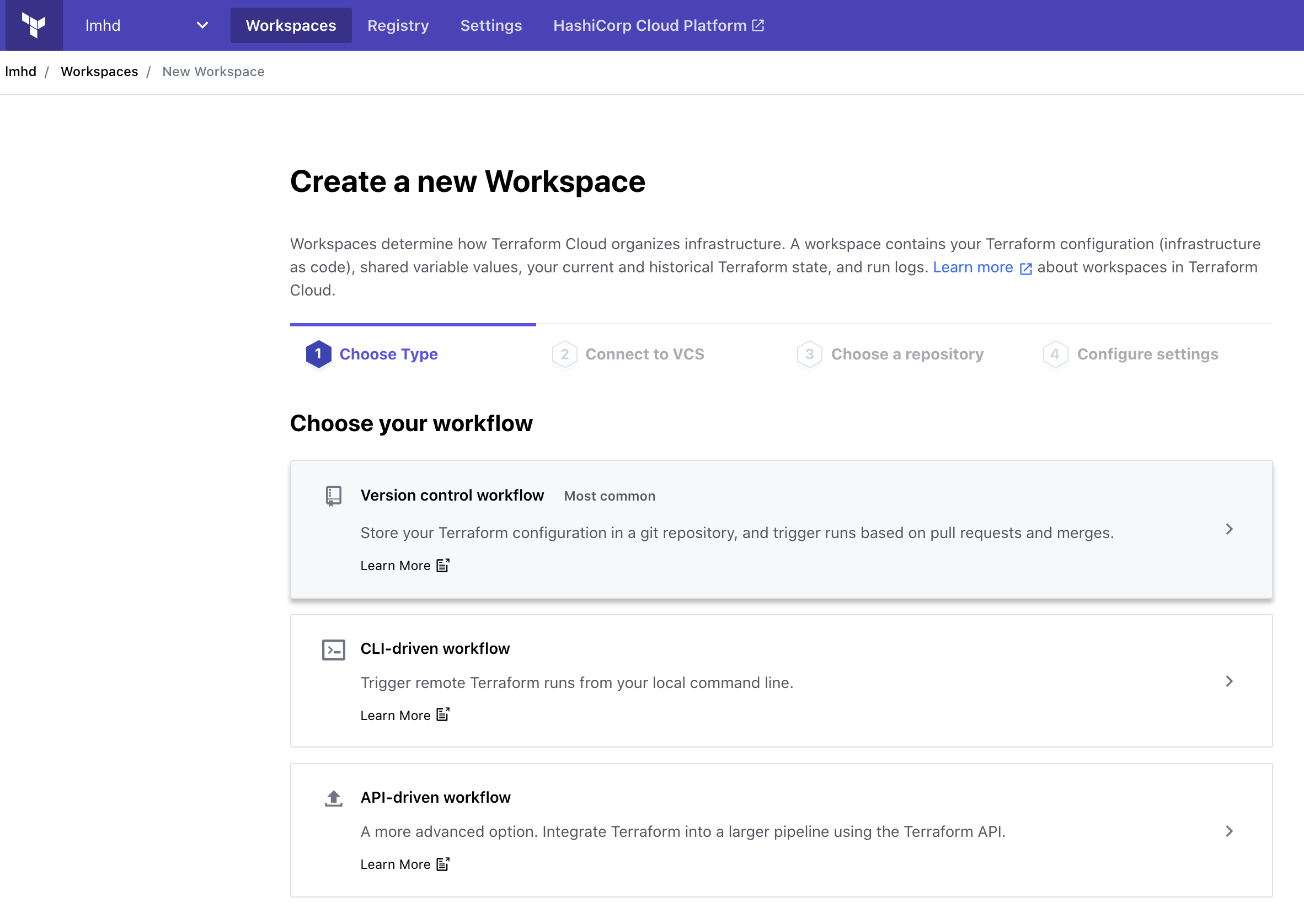
<p>First things first, we need to create a new Workspace. I’m using the Version control workflow, so I can link it to a Git repo, and not have to worry about things:</p>

<p><img src="/images/posts/2021-04-07/tfc-01-create-workspace.png" alt="Terraform Cloud, Create a new Workspace UI, Step 1: Choose Type. Version control workflow is highlighted" /></p>

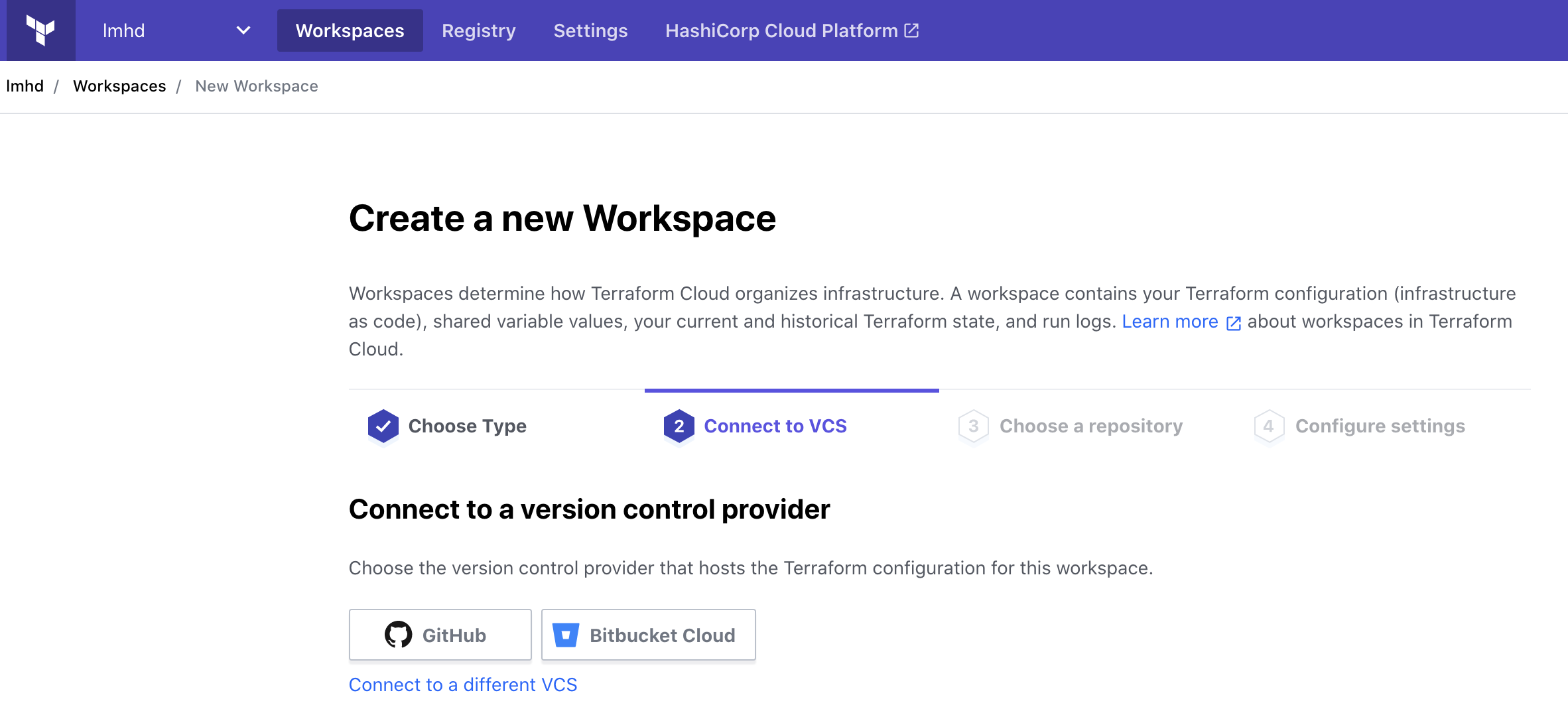
<p>In my case, my Terraform code is stored in GitHub, so I’ll select that:</p>

<p><img src="/images/posts/2021-04-07/tfc-02-connect-to-vcs.png" alt="Terraform Cloud, Create a new Workspace UI, Step 2: Connect to VCS. Options in this example are GitHub and BitBucket, with the option to connect to a different VCS" /></p>

<p>And I’ll pick my <code class="language-plaintext highlighter-rouge">vault_terraform</code> repo:</p>

<p><img src="/images/posts/2021-04-07/tfc-03-choose-repo.png" alt="Terraform Cloud, Create a new Workspace UI, Step 3: Choose a repository. Filtered to repos named &quot;vault_&quot;, we see one repo: &quot;vault_terraform&quot;" /></p>

<p>As far as Settings go, I’m going to call my workspace “vault”:</p>

<p><img src="/images/posts/2021-04-07/tfc-04-configure-settings.png" alt="Terraform Cloud, Create a new Workspace UI, Step 4: Settings. Workspace Name is &quot;vault&quot;" /></p>

<p>And I’m going to expand the Advanced options and enable Automatic speculative plans. This should mean that if I make Pull Requests into this repo, then Terraform Cloud will run <code class="language-plaintext highlighter-rouge">terraform plan</code> on them. Pretty useful.</p>

<p><img src="/images/posts/2021-04-07/tfc-05-speculative-plans.png" alt="Terraform Cloud, Create a new Workspace UI, Step 4: Settings. Automatic speculative plans is enabled" /></p>

<p>We’re almost done!</p>

<h1 id="terraform-cloud-vault-auth">Terraform Cloud Vault Auth</h1>

<p>Now that we have Terraform Cloud configured to use our Terraform code, we need to tell it how to find Vault, and how to auth.</p>

<p>We’ll start with the latter.</p>

<p>Remember how, in the Terraform code, we defined some AppRole variables, but didn’t set any values?</p>

<div class="language-plaintext highlighter-rouge"><div class="highlight"><pre class="highlight"><code>variable "login_approle_role_id" {}
variable "login_approle_secret_id" {}
</code></pre></div></div>

<p>We’ll set those now.</p>

<p>Back in our Vault UI’s Browser CLI, we can read the AppRole’s Role ID with:</p>

<div class="language-plaintext highlighter-rouge"><div class="highlight"><pre class="highlight"><code>&gt; read auth/approle/role/vault_terraform/role-id
</code></pre></div></div>

<p>And we can generate a Secret ID with:</p>

<div class="language-plaintext highlighter-rouge"><div class="highlight"><pre class="highlight"><code>&gt; write -force auth/approle/role/vault_terraform/secret-id
</code></pre></div></div>

<p>In our Terraform Cloud Workspace, we can add these as Terraform Variables. These are secrets, so I recommend marking them as Sensitive, so they do not show up in the UI and cannot be read.</p>

<p>We can also add the address for our Vault as an Environment Variable, <code class="language-plaintext highlighter-rouge">VAULT_ADDR</code>.</p>

<p><img src="/images/posts/2021-04-07/tfc-06-variables.png" alt="Terraform Cloud, Variables page. Two Terraform variables defined: login_approle_role_id and login_approle_secret_id. One environment variable set: VAULT_ADDR=https://vault.fancycorp.io" /></p>

<p>And that should be everything.</p>

<h1 id="but-does-it-work">But does it work?</h1>

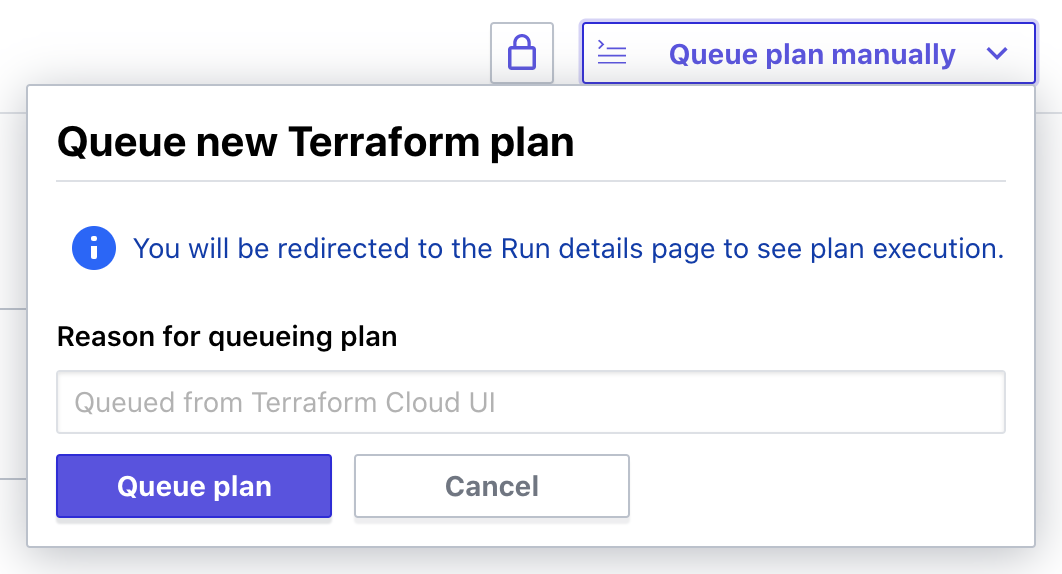
<p>In the Runs tab, we can trigger a new plan:</p>

<p><img src="/images/posts/2021-04-07/tfc-07-trigger-plan.png" alt="Terraform Cloud, queue plan manually dropdown" /></p>

<p>I’m redirected to the Run details page for this Plan, and pretty quickly I can see that Terraform wants to make some changes:</p>

<div class="language-plaintext highlighter-rouge"><div class="highlight"><pre class="highlight"><code>Terraform v0.14.9
Configuring remote state backend...
Initializing Terraform configuration...

An execution plan has been generated and is shown below.
Resource actions are indicated with the following symbols:
  + create

Terraform will perform the following actions:

  # vault_generic_secret.example will be created
  + resource "vault_generic_secret" "example" {
      + data         = (sensitive value)
      + data_json    = (sensitive value)
      + disable_read = false
      + id           = (known after apply)
      + path         = "kv/terraform"
    }

Plan: 1 to add, 0 to change, 0 to destroy.
</code></pre></div></div>

<p>I’m asked to confirm before it applies anything, and then we see that the Apply has been successful.</p>

<div class="language-plaintext highlighter-rouge"><div class="highlight"><pre class="highlight"><code>Terraform v0.14.9
vault_generic_secret.example: Creating...
vault_generic_secret.example: Creation complete after 1s [id=kv/terraform]

Apply complete! Resources: 1 added, 0 changed, 0 destroyed.
</code></pre></div></div>

<p>And if we check in Vault, we can see that a secret has been created:</p>

<p><img src="/images/posts/2021-04-07/vault-01-secret.png" alt="Vault Secret, at kv/terraform. Data is foo=bar, pizza=cheese" /></p>

<p>And to make sure it’s persisting state and reading from Vault, I’m going modify that secret by hand, then run Terraform again.</p>

<p>This time we see the plan:</p>

<div class="language-plaintext highlighter-rouge"><div class="highlight"><pre class="highlight"><code>Terraform v0.14.9
Configuring remote state backend...
Initializing Terraform configuration...
vault_generic_secret.example: Refreshing state... [id=kv/terraform]

An execution plan has been generated and is shown below.
Resource actions are indicated with the following symbols:
  ~ update in-place

Terraform will perform the following actions:

  # vault_generic_secret.example will be updated in-place
  ~ resource "vault_generic_secret" "example" {
      ~ data_json    = (sensitive value)
        id           = "kv/terraform"
        # (3 unchanged attributes hidden)
    }

Plan: 0 to add, 1 to change, 0 to destroy.
</code></pre></div></div>

<p>So I’m satisfied that everything is working as it should.</p>

<h1 id="next-steps">Next Steps</h1>

<p>So it’s pretty basic so far, but it’s a good foundation to build from.</p>

<p>My next steps with this will be to Terraform the chicken/egg things. i.e. the <code class="language-plaintext highlighter-rouge">vault_terraform</code> Policy and AppRole, and then work my way through the rest of the configuration I already have.</p>

<p>I’m also going to see if I can dynamically determine the IP addresses for Terraform Cloud<sup id="fnref:5" role="doc-noteref"><a href="#fn:5" class="footnote" rel="footnote">5</a></sup>, and add those as a CIDR restriction on the AppRole.</p>

<p>Should be fun!</p>

<div class="footnotes" role="doc-endnotes">
  <ol>
    <li id="fn:1" role="doc-endnote">
      <p>You can <a href="https://www.youtube.com/watch?v=vD3_jeqGx6M&amp;list=PLdfwCbsYUpU-7VyTGuHf3iFHc3r6mtsPA&amp;index=2">watch my Vault Terraform HashiConf talk on YouTube</a>, or <a href="https://www.hashicorp.com/resources/how-we-accelerated-our-vault-adoption-with-terraform">read it on the HashiCorp website</a> <a href="#fnref:1" class="reversefootnote" role="doc-backlink">&#8617;</a></p>
    </li>
    <li id="fn:2" role="doc-endnote">
      <p>At time of writing, Sky Betting &amp; Gaming is my employer. We have a <a href="https://sbg.technology/">technology blog</a> if you want to check it out <a href="#fnref:2" class="reversefootnote" role="doc-backlink">&#8617;</a></p>
    </li>
    <li id="fn:3" role="doc-endnote">
      <p>oh no, don’t give me ideas… <a href="#fnref:3" class="reversefootnote" role="doc-backlink">&#8617;</a></p>
    </li>
    <li id="fn:4" role="doc-endnote">
      <p><a href="https://registry.terraform.io/providers/hashicorp/tfe/latest">Terraform Cloud Terraform Provider</a> <a href="#fnref:4" class="reversefootnote" role="doc-backlink">&#8617;</a></p>
    </li>
    <li id="fn:5" role="doc-endnote">
      <p>HashiCorp have <a href="https://www.terraform.io/docs/cloud/api/ip-ranges.html">an API to list Terraform Cloud IP ranges</a> <a href="#fnref:5" class="reversefootnote" role="doc-backlink">&#8617;</a></p>
    </li>
  </ol>
</div>]]></content><author><name>Lucy Davinhart</name></author><category term="tech" /><category term="terraform" /><category term="terraform cloud" /><category term="vault" /><summary type="html"><![CDATA[Setting up a Terraform Cloud workspace to manage Vault congfiguration]]></summary></entry><entry><title type="html">Testing Netlify CMS</title><link href="http://lmhd.me/tech/2018/12/14/testing-netlify-cms/" rel="alternate" type="text/html" title="Testing Netlify CMS" /><published>2018-12-14T15:14:42+00:00</published><updated>2018-12-14T15:14:42+00:00</updated><id>http://lmhd.me/tech/2018/12/14/testing-netlify-cms</id><content type="html" xml:base="http://lmhd.me/tech/2018/12/14/testing-netlify-cms/"><![CDATA[<p>While LMHD.me is primarily a landing page with links to my social, I do occasionally post long-form posts to it. I don’t have a link to them on the front page (yet), but I might do that again at some point.</p>

<p>I’ve added <a href="https://www.netlifycms.org/">Netlify CMS</a> to my site, because it’s pretty cool, and seems like a good idea.</p>

<p>The instructions I followed are here: <a href="https://www.netlifycms.org/docs/add-to-your-site/">https://www.netlifycms.org/docs/add-to-your-site/</a></p>

<p>I also used an example config file from here: <a href="https://github.com/netlify-templates/jekyll-netlify-cms/blob/master/admin/config.yml">https://github.com/netlify-templates/jekyll-netlify-cms/blob/master/admin/config.yml</a></p>

<p>In the case of my blog, that was two commits:</p>

<p><a href="https://github.com/lucymhdavies/lucymhdavies.github.io/commit/2755181bb96d1b19c129257fe513874e802bc82f">https://github.com/lucymhdavies/lucymhdavies.github.io/commit/2755181bb96d1b19c129257fe513874e802bc82f</a></p>

<p>This is adds the admin page, Netlify CMS config, and scripts on the main page to redirect me to the CMS once I log in.</p>

<p>I also needed this, because copypaste errors are <em>the best</em></p>

<p><a href="https://github.com/lucymhdavies/lucymhdavies.github.io/commit/bd48bb649f76c2b2423162873ee669c687a504f4">https://github.com/lucymhdavies/lucymhdavies.github.io/commit/bd48bb649f76c2b2423162873ee669c687a504f4</a></p>

<p>Does it work?</p>

<p>Yes.</p>

<p>Yes it does. And it’s really nice.</p>

<p>I log into it using Netlify Identity service, using my Google account. I can create a new post, and when I save it it immediately creates a new PR in my GitHub Repo:</p>

<p><a href="https://github.com/lucymhdavies/lucymhdavies.github.io/pull/5">https://github.com/lucymhdavies/lucymhdavies.github.io/pull/5</a></p>

<p>This in turn triggers an automatic deployment, so I can preview my changes.</p>

<p>The only slight annoyance I have with it so far is that my current posts and images are structures like so:</p>

<div class="language-plaintext highlighter-rouge"><div class="highlight"><pre class="highlight"><code>🐳 :lucymhdavies.github.io lucy $ tree _posts/
_posts/
├── 2017
│   ├── 03
│   │   ├── 2017-03-30-Init.md
│   │   └── 2017-03-30-jekyll-from-ios.md
│   └── 04
│       └── 2017-04-02-dns-under-one-roof.md
├── 2018
│   ├── 03
│   │   └── 2018-03-15-nail-polish.md
│   └── 07
│       └── 2018-07-22-emoji-graphs.md
└── cms

7 directories, 5 files

🐳 :lucymhdavies.github.io lucy $ tree images/
images/
├── 404.jpg
├── LMHD_xs.png
├── avatar.jpg
├── bg.jpg
├── both.gif
├── cms
├── post.PNG
├── posts
│   ├── 2018-03-15
│   │   └── captain-obvious.jpg
│   └── 2018-07-22
│       ├── attention.gif
│       ├── emojitracker.png
│       └── final-graph.png
├── ss-color.png
└── ss.png

4 directories, 12 files
</code></pre></div></div>

<p>And Netlify CMS doesn’t appear to have an obvious way of nested subdirectories for images and posts, meaning it doesn’t automatically see my previous posts.</p>

<p>No matter. That’s easily fixed. I moved my posts to a common directory:</p>

<p><a href="https://github.com/lucymhdavies/lucymhdavies.github.io/commit/2047f087a2985a1f732dc1bd45bdd81817a8b7d0">https://github.com/lucymhdavies/lucymhdavies.github.io/commit/2047f087a2985a1f732dc1bd45bdd81817a8b7d0</a></p>

<p>With that change, Netlify CMS picked up my existing posts</p>

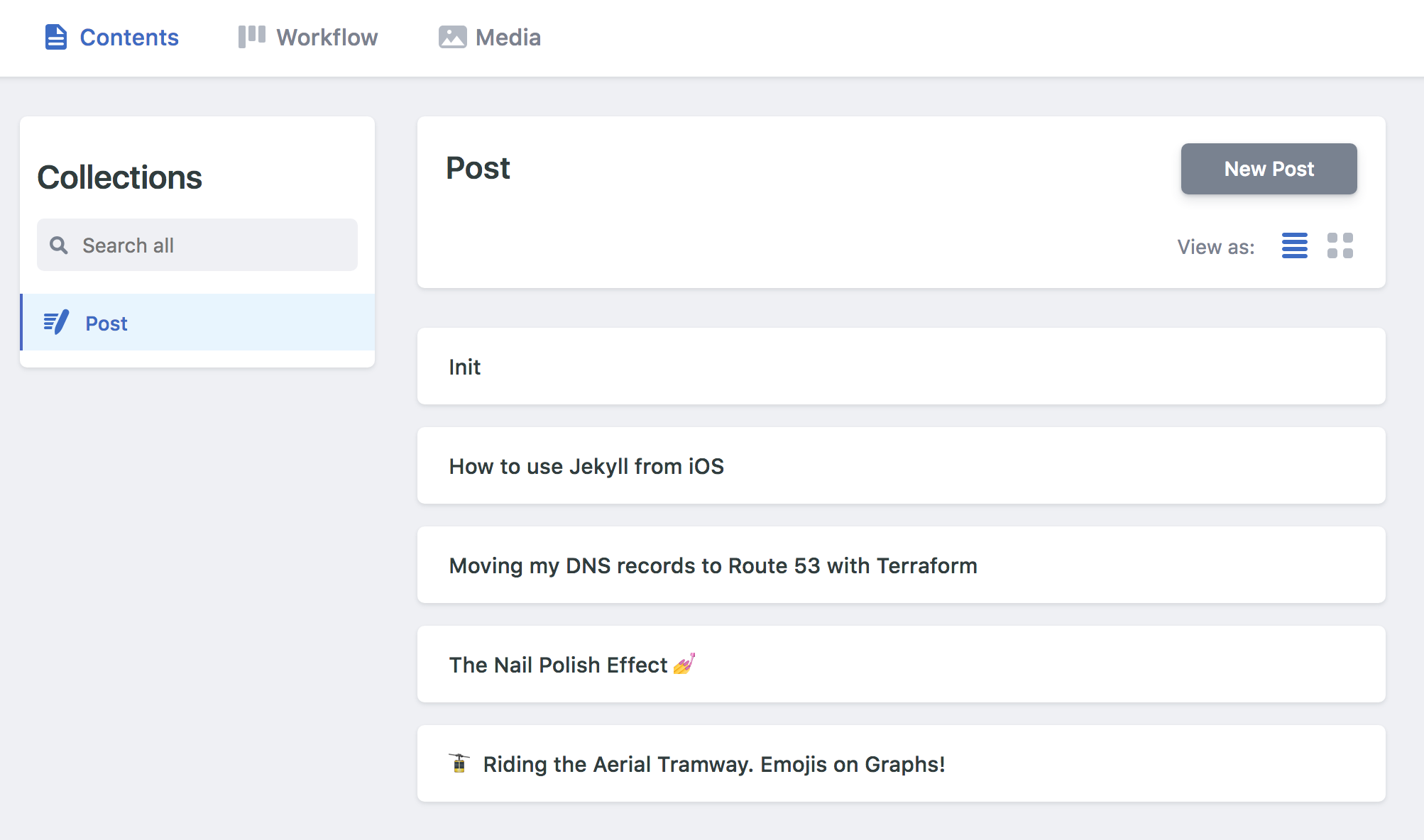
<p><img src="/images/cms/screen-shot-2018-12-14-at-15.49.19.png" alt="Screenshot of CMS, with 5 posts listed" /></p>

<p>I’ve not done this for images yet, as I’d need to go through all my existing posts and update them inline too. I might do that at some point, but I’m not too worried for now.</p>

<p>But all-in-all… Seems pretty cool so far :)</p>]]></content><author><name>Lucy Davinhart</name></author><category term="tech" /><category term="test" /><category term="netlify" /><category term="netlify cms" /><summary type="html"><![CDATA[Netlify CMS seems pretty cool. How well does it work?]]></summary></entry><entry><title type="html">Making Silly Things</title><link href="http://lmhd.me/talk/silly" rel="alternate" type="text/html" title="Making Silly Things" /><published>2018-11-01T18:00:00+00:00</published><updated>2018-11-01T18:00:00+00:00</updated><id>http://lmhd.me/talk/silly-talk</id><content type="html" xml:base="http://lmhd.me/talk/silly"><![CDATA[<p>Presented at <a href="https://www.meetup.com/GoSheffield/events/255018075/">GoSheffield, November 2018</a></p>

<h1 id="slides">Slides</h1>

<p><a href="https://talks.lmhd.me/silly.html"><img src="/images/cms/silly-talk-title-slide.png" alt="Title Slide. Upside down smily face emoji, @LucyDavinhart, Making Silly Things" /></a></p>

<p><a href="https://talks.lmhd.me/silly.html">https://talks.lmhd.me/silly.html</a></p>

<h1 id="script--speaker-notes">Script / Speaker Notes</h1>

<h2 id="0---title-slide">0 - Title slide</h2>

<p><code class="language-plaintext highlighter-rouge">&lt;show emoji and twitter handle&gt;</code></p>

<p>As much as I’d like my talk to be named Upside Down Smiley Face Emoji, you’d have no idea what to expect seeing that on meetup.com</p>

<p><code class="language-plaintext highlighter-rouge">&lt;reveal title&gt;</code></p>

<p>So I’m gonna talk about making silly things, and why you should do it.</p>

<h2 id="1---emojis---example-of-being-silly">1 - Emojis - Example of being Silly</h2>

<p>Let’s start with an example. I have a reputation for perhaps being a little enthusiastic when it comes to emojis. And so while ago, this manifested as this:</p>

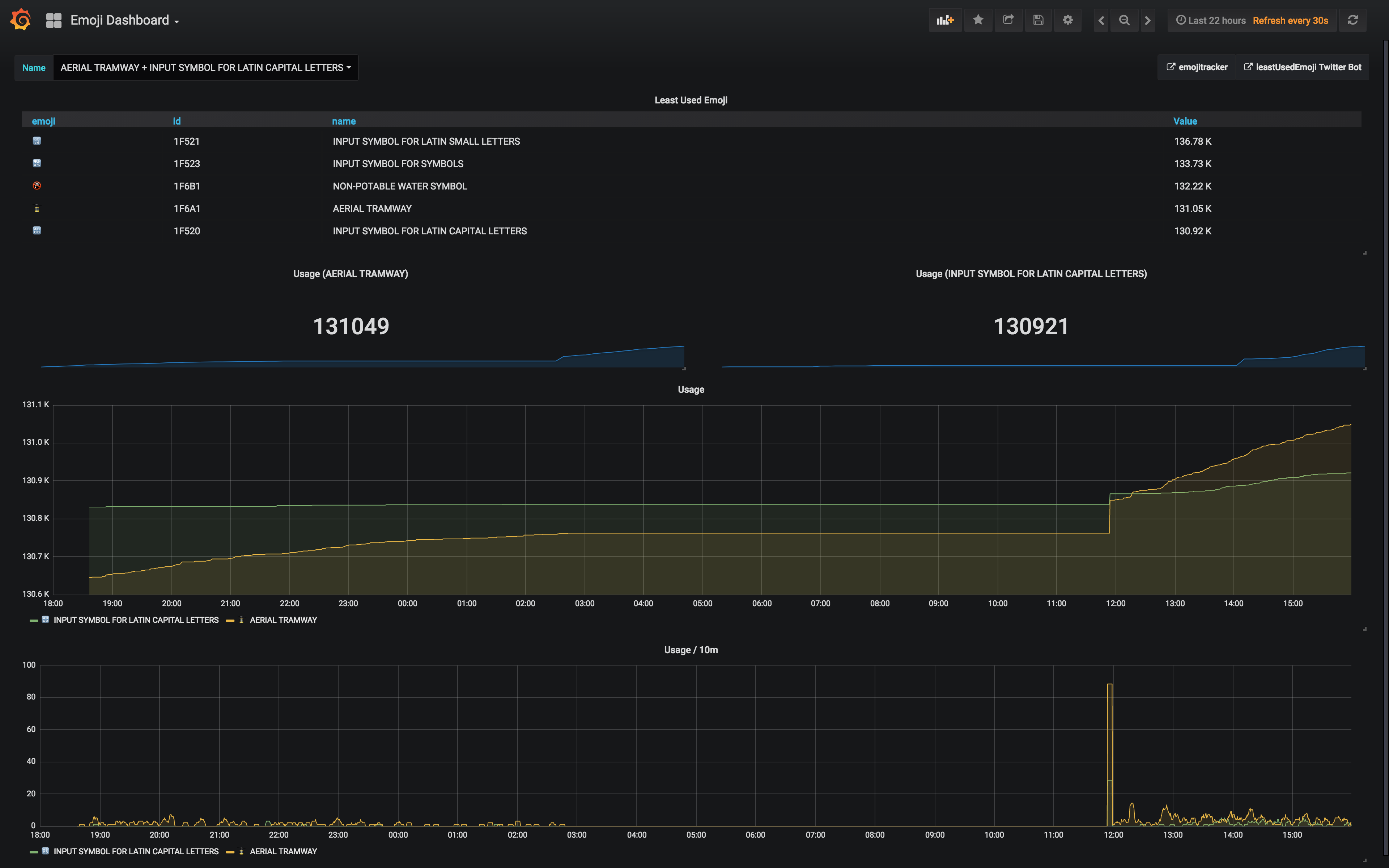
<p><code class="language-plaintext highlighter-rouge">&lt;screenshot of emoji grafana dashboard&gt;</code></p>
<ul>
  <li>This is a screenshot of something I put together one Friday afternoon at work.</li>
</ul>

<p><code class="language-plaintext highlighter-rouge">&lt;live view&gt;</code></p>
<ul>
  <li>And here it is live. </li>
  <li>What you’re looking at is a graph of emoji usage on Twitter, in close to real-time. I’ve filtered it to one unpopular one in particular. If the demo gods will allow, here’s a tweet that proves it. </li>
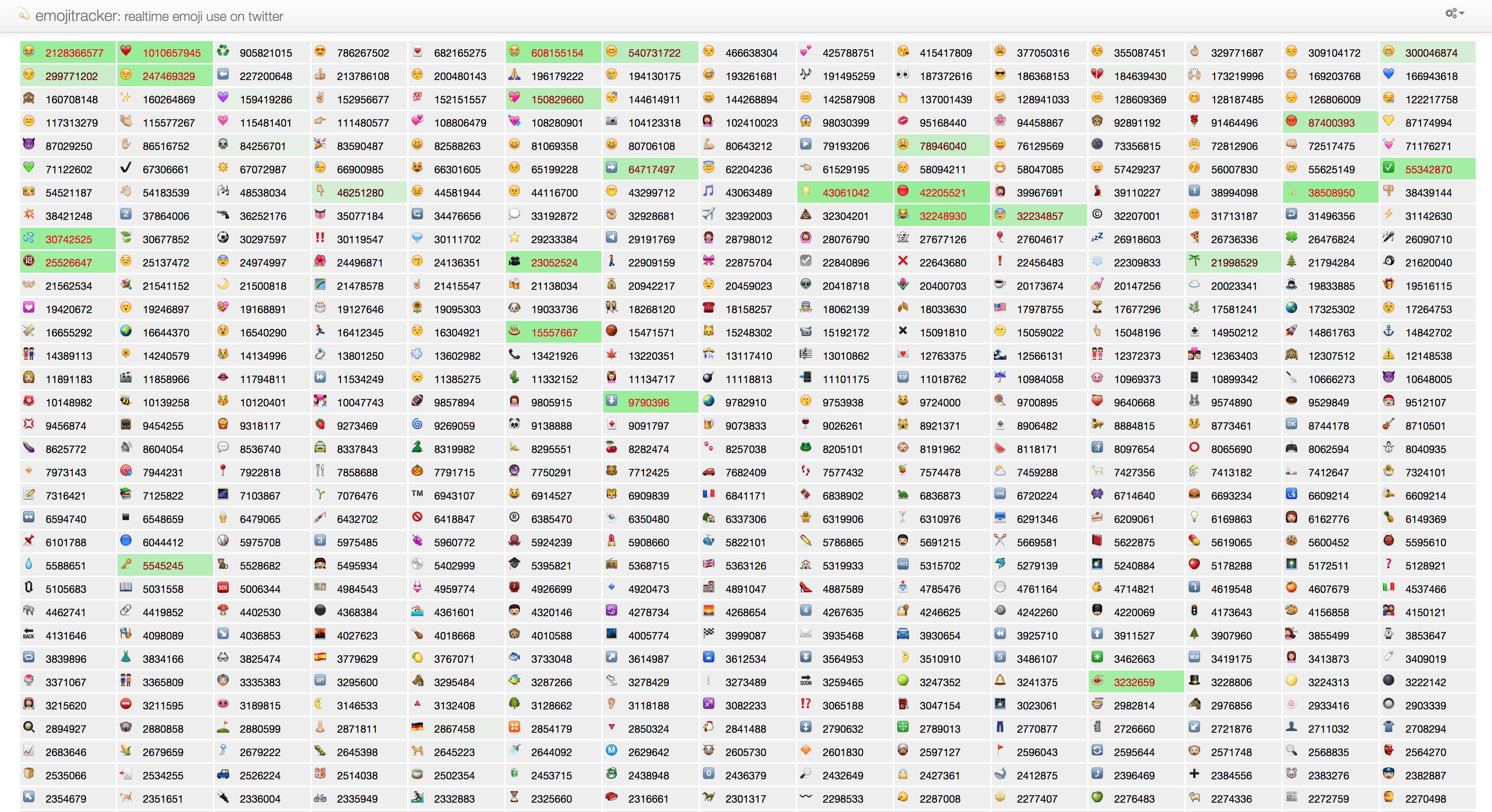
  <li>So this is built on top of something called emojitracker, which uses the twitter apis to keep track of all tweets containing emojis, in real-time. And it has its own streaming api, which returns a stream of linebreak-separated-json with stats about what emojis have been used recently. </li>
  <li>The part I wrote takes that data and outputs a Prometheus metrics page, which I’m showing here as Grafana graph. So this graph is 3 or 4 APIs abstracted from what’s going on on twitter. </li>
  <li>If you’re unfamiliar with Prometheus, it’s a really good tool for monitoring your systems. Usually used for things like how much CPU idle a particular server has, or memory usage, disk space. It has a lot of integration, but you can write your own custom integrations with their go SDKs, which is what this is.</li>
</ul>

<p>And you may be asking yourself… why?</p>
<ul>
  <li>And I made this for two reasons:</li>
</ul>

<p>Firstly, Just Because.</p>

<p>This silly idea of mine was prompted by a twitter bot I found which was tracking the least used emojis in emojitracker, tweeting it out on a schedule.</p>
<ul>
  <li>The only thing even resembling a purpose for it was as part of an experiment, to test a theory I had, to see if I could predict what people would do in response to this bot. I suspected that, with this bot getting attention, that would be enough that what was the least used at the time would eventually become the second least used.</li>
</ul>

<p>Crossover point</p>
<ul>
  <li>And that allowed me to get this graph, which is the moment that happened, about 2 days after I created this, about 12 hours later than I predicted based on linear regression. </li>
  <li>And it didn’t actually take that long to put together either. I said an afternoon, but it’s building on a similar thing I put together a few weeks prior which was getting stats from twitch.tv, so I’d already done the hard work. I’m not gonna show the code on screen, because it’s not that interesting, and not actually very good. But you can dig it up from my GitHub later if you want. </li>
  <li>But both this, and the original Twitch version, gave me a much better understanding of how Prometheus exporters work, which meant that a few weeks later, when I needed to do one for my job, it wasn’t a strange new concept that I’d have to learn.</li>
</ul>

<h2 id="2---so-why-am-i-talking-about-this">2 - So why am I talking about this?</h2>

<p>First we have to go back a few years…</p>

<h2 id="3---rewind">3 - Rewind</h2>

<ul>
  <li>Back when I was about yay tall, went by a different name, and thought Visual Basic 6 was the coolest thing ever, I’d make all sorts of random stuff for fun. I didn’t really know what I was doing, and was blissfully ignorant of that fact; I was just making stuff, because I had ideas in my head I needed to get down on silicon. </li>
  <li>What happened? </li>
  <li>It wasn’t until I got to university that I was actually properly taught how to write code. There was suddenly this idea that there was a right or a wrong way of doing things, and that my code could be bad. It didn’t help that I was surrounded by smart people who were better than me (my brain conveniently filtered out the people who weren’t). </li>
  <li>My skills improved, and my code got much better, as I learned better ways of doing things, but I also got to see and appreciate what quality looked like… and there was a gap between that and my work. I wasn’t there yet, so I’d feel like a failure.</li>
</ul>

<h2 id="4---impostor-syndrome---the-problem">4 - Impostor Syndrome - The problem</h2>

<p>Impostor syndrome begins</p>

<ul>
  <li>This is impostor syndrome, a feeling that you don’t actually know what you’re doing, despite evidence of the contrary. Apparently about 70% of people get it at some point in their lives. </li>
  <li>It got worse for me when I started my first job, so in addition to being surrounded my smart people, I was surrounded by people who understood the massive million-lines-of-code monoliths the company developed. Let’s ignore the fact that no one person really understood the whole thing. </li>
  <li>It was exhausting, and the side projects I was working on at home stalled.</li>
</ul>

<p>Fear of harsh judgement</p>
<ul>
  <li>So part of this comes from a fear of being judged harshly. That people will look at your work and mock it for being so bad.</li>
</ul>

<p>Fear of harsh judgement, cont.</p>
<ul>
  <li>This fear of judgement in my case is not just limited to coding, but is sort of a horizontal slice through all aspects of my life. </li>
  <li>For example, I’m a woman, and a trans woman at that, I’d find myself sometimes not fitting in with the heavily male dominated industry. I tried to fit in, so that I wouldn’t be judged for being different, but I ended up spending energy on that which could have been better spent elsewhere. </li>
  <li><code class="language-plaintext highlighter-rouge">&lt;wonder women who go&gt; &lt;trans gopher&gt;</code></li>
</ul>

<p>Fear of Failure</p>
<ul>
  <li>This is something I struggled with for the longest time; when faced with a new technology I need to use for my day job, I find it hard to admit that learning something new under time pressure can be stressful, and take longer than anticipated. </li>
  <li>This often leads to me staying late in office if I don’t make as much progress as I had hoped, which is something I’m working on getting better at. </li>
  <li>Something I realised was happening with with my side projects was that I wasn’t working on things because I expected them to fail. I’d cling on to ideas as “something I’d work on when I’m better at this”, because I didn’t want them to fail. But of course, that meant I wasn’t making them.</li>
</ul>

<p>Big Ideas are overwhelming</p>
<ul>
  <li>There’s this idea I first learned about in the context of art, which is that as you become a better artist, you get better at appreciating quality faster than your ability to create improves. So you feel like you’re getting worse, when what’s actually happening is your goals are getting bigger. </li>
  <li>That’s something which definitely happened to me; I was that kid in uni who thought they were gonna create the next big social network that everyone would want to use… based around an idea which, in retrospect, is actually maybe only useful for me and a few other people, and which could probably be achieved with something much simpler than what I had in mind. But I didn’t know that back then, so I’d accumulate feature creep over time without so much as writing one line of code. </li>
</ul>

<h2 id="5---the-solution">5 - The Solution?</h2>

<p>These days, I have the word “Senior” in my job title, so people seem to think I’m awesome. They might be right… [pause for laughter?] but nah, the impostor syndrome is still there. I’m just getting better at dealing with it.</p>

<p>Doing Stuff Because It Scares You</p>
<ul>
  <li>So this goes back to fear of being judged. Turns out, asking people to review my code… not that big a deal. Everywhere I’ve worked so far, any time I submit things for review, I get constructive feedback. Yes there are often problems with the code, but it’s clear that those are not problems with me, and I always learn how to do things better in future. </li>
  <li>I’ve taught people how stuff works, both at my old job and my current job. That was a weird feeling at first: impostor syndrome telling me I didn’t know what I was talking about, and me proving it wrong by explaining stuff to people. </li>
  <li>And of course, I’m standing in front of you giving this talk, despite the fact that just last night I was convinced I had no idea what I was talking about. </li>
  <li>Doing scary things makes doing scary things easier. </li>
  <li>And over time I’ve learned to be myself more, and I’ve found myself not worrying so much about what others think of me.</li>
</ul>

<p>Prototypes &amp; Silly Things</p>

<ul>
  <li>
    <p>Big ideas can be great, but they’re made up of lots of small bits, and unless you’re a super genius you won’t immediately know how to make the entire thing in one go. So biting off small bits, experimenting with ideas related to it, and building up your knowledge, until eventually you do have all the skills you need to build something big if you want to.</p>
  </li>
  <li>This should be obvious, but it’s something I used to undervalue. </li>
  <li>Experiment. Prototype stuff. Try lots of things. If one works out well, great, you can improve on it. </li>
  <li>Often when you have an idea, you have no idea if it’s any good, so you can spend hours or weeks or months over engineering the most elegant of things… only to find that actually, it wasn’t that great an idea in the first place. </li>
  <li>I have a git repo full of unfinished experiments, where I wanted to try out a new library or an idea I had. </li>
  <li>Some of those ideas have graduated to their own repos, like the emoji exporter. Some are still little things I’m tinkering with every now and then. None of them are examples of my best code; all are ideas I wanted to try out. </li>
  <li>In the spirit of learning not to be afraid of writing bad code, I keep it open. I don’t imagine many people are going to find it, but it’s there should I ever want to point somebody at a thing I’ve been experimenting with.</li>
</ul>

<p>L&amp;D Time</p>

<ul>
  <li>You may remember I said this emoji exporter was done on a Friday afternoon at work. </li>
  <li>I wasn’t slacking off, honest; we have a thing called Learning &amp; Development time where we can work on stuff that’s not work related, or read a book, watch training videos, etc. Anything to further our own learning and development. </li>
  <li>This is something I’ve seen a few companies do. For me personally, I get silly ideas like that Prometheus exporter for twitter emojis all the time, and before L&amp;D time was a thing, I’d make a note of them, but never really find time outside of work to focus on them. </li>
  <li>And one of the great things about this is that it teaches you to give yourself Permission to Fail. </li>
  <li>L&amp;D time is for you to do what you want, you’re not committing to shipping anything at the end of it. With this structured L&amp;D time, or even in your own time making something silly without any commitment to producing anything of value at the end of it, you’re training yourself to try new ideas, and accept that sometimes stuff doesn’t work out. Then in theory, when you’re struggling with your day job, it becomes less difficult to admit that it’s not working out and that you might need help. I’m still working on that one, but this sort of thing really helps with that.</li>
</ul>

<p>Go!</p>

<ul>
  <li>And I want to bring things back to Go; this is Go Sheffield after all. </li>
  <li>While Ruby was the language that got me back into working in side-projects, it was Go that made things fun again. </li>
  <li>There are several thing which really drew me to Go which I want to highlight </li>
  <li>Superficially, it’s impossible to write badly formatted Go code when GoFmt and GoImports exists, and can be configured to run automatically when you save. I know this isn’t unique to go. Saves me from being distracted, and just get on with writing the code. </li>
  <li>It’s also really easy to read and understand, especially when it come to figuring out what comes from which libraries. This sort of thing makes it much easier to teach yourself the language than, say, Ruby, where I’ve often seen package names that don’t quite match the name of the gem which provides them, and monkeypatched functions that you just have to know where things are coming from. </li>
  <li>But I think mostly, the reason is that when I first started learning go, like when I was learning ruby, and like when I was learning Visual Basic 6 back in the day… I was learning by myself how it worked rather than being taught. And it seemed super intimidating at first (my first Go project was this tool that someone in my team wrote that was complicated and intimidated me. He’s now gone off and is doing other things, and now I’m the expert in this particular tool). </li>
  <li>I can look back and see how far I’ve come with it, so when I look forward at all the things i know exist but which I’ve not used before, i know that I can teach myself how to do anything I want with it. </li>
  <li>And that even if I don’t have an obvious use for some features now, that I’ll be able to come up with something silly I can use to teach myself how it works.</li>
</ul>

<h2 id="6---end">6 - End</h2>

<p>So yeah, that’s all I have for you.</p>

<p>Look for things you don’t understand, and come up with silly ideas as an excuse to experiment with them.</p>

<p>Thank you!</p>]]></content><author><name>Lucy Davinhart</name></author><category term="talk" /><category term="grafana" /><category term="prometheus" /><category term="emojis" /><category term="impostor syndrome" /><category term="go" /><summary type="html"><![CDATA[Slides and Speaker Notes for my GoSheffield November 2018 talk on making silly things]]></summary></entry><entry><title type="html">🚡 Riding the Aerial Tramway. Emojis on Graphs!</title><link href="http://lmhd.me/tech/2018/07/22/emoji-graphs/" rel="alternate" type="text/html" title="🚡 Riding the Aerial Tramway. Emojis on Graphs!" /><published>2018-07-22T15:40:00+01:00</published><updated>2018-07-22T15:40:00+01:00</updated><id>http://lmhd.me/tech/2018/07/22/emoji-graphs</id><content type="html" xml:base="http://lmhd.me/tech/2018/07/22/emoji-graphs/"><![CDATA[<script async="" src="https://platform.twitter.com/widgets.js" charset="utf-8"></script>

<h1 id="initial-interest">Initial Interest</h1>

<p>A few days ago (the day after <a href="https://worldemojiday.com/">World Emoji Day</a> as it happens) I discovered a tweet:</p>

<blockquote class="twitter-tweet" data-lang="en-gb"><p lang="en" dir="ltr">Y’all know what to do <a href="https://t.co/YCRHtJfWAk">https://t.co/YCRHtJfWAk</a></p>&mdash; Lucy Davinhart (@LucyDavinhart) <a href="https://twitter.com/LucyDavinhart/status/1019471467719872512?ref_src=twsrc%5Etfw">18 July 2018</a></blockquote>

<p>Apparently there’s a bot keeping track of which emojis get the most use. It’s made by <a href="https://twitter.com/nocturnalBadger">Jeremy Schmidt</a> and is called, fittingly, LeastUsedEmojiBot. You can find the code <a href="https://github.com/nocturnalbadgr/LeastUsedEmojiBot">on GitHub</a></p>

<p>As a fan of emojis in general, this got me interested. Obviously I wanted to try to help the humble Aerial Tramway emoji reach its true potential of second least used emoji on Twitter.</p>

<p>As</p>

<blockquote class="twitter-tweet" data-lang="en-gb"><p lang="en" dir="ltr">To keep track, we are on 128916 at the moment. 🚡</p>&mdash; Lucy Davinhart (@LucyDavinhart) <a href="https://twitter.com/LucyDavinhart/status/1019471901486436353?ref_src=twsrc%5Etfw">18 July 2018</a></blockquote>

<p>You</p>

<blockquote class="twitter-tweet" data-lang="en-gb"><p lang="en" dir="ltr">And I think it only counts number of tweets it’s used in, rather than number of uses.<br /><br />It does appear to update pretty dam quick.<br /><br />🚡🚡🚡🚡🚡🚡🚡🚡🚡🚡</p>&mdash; Lucy Davinhart (@LucyDavinhart) <a href="https://twitter.com/LucyDavinhart/status/1019472209918689280?ref_src=twsrc%5Etfw">18 July 2018</a></blockquote>

<p>May</p>

<blockquote class="twitter-tweet" data-lang="en-gb"><p lang="en" dir="ltr">Yep. One per tweet. 🚡</p>&mdash; Lucy Davinhart (@LucyDavinhart) <a href="https://twitter.com/LucyDavinhart/status/1019472457093255168?ref_src=twsrc%5Etfw">18 July 2018</a></blockquote>

<p>Have</p>

<blockquote class="twitter-tweet" data-lang="en-gb"><p lang="en" dir="ltr">Also, nice.<br /><br />🚡 <a href="https://t.co/gE9CpRsIdb">https://t.co/gE9CpRsIdb</a></p>&mdash; Lucy Davinhart (@LucyDavinhart) <a href="https://twitter.com/LucyDavinhart/status/1019472768868540417?ref_src=twsrc%5Etfw">18 July 2018</a></blockquote>

<p>Noticed</p>

<blockquote class="twitter-tweet" data-lang="en-gb"><p lang="en" dir="ltr">Me: *slaps twitter*<br /><br />This baby can hold so many 🚡🚡🚡🚡🚡🚡🚡🚡🚡🚡🚡🚡🚡🚡🚡🚡🚡🚡🚡🚡🚡🚡🚡🚡🚡🚡🚡🚡🚡🚡🚡🚡🚡🚡🚡🚡🚡🚡🚡🚡🚡🚡🚡🚡🚡🚡🚡🚡🚡🚡🚡🚡🚡🚡🚡🚡🚡🚡🚡🚡🚡🚡🚡🚡🚡🚡🚡🚡🚡🚡🚡🚡🚡🚡🚡🚡🚡🚡🚡🚡🚡🚡🚡🚡🚡🚡🚡🚡🚡🚡🚡🚡🚡🚡🚡🚡🚡🚡🚡🚡🚡🚡🚡🚡🚡🚡🚡🚡🚡🚡🚡🚡🚡🚡🚡🚡</p>&mdash; Lucy Davinhart (@LucyDavinhart) <a href="https://twitter.com/LucyDavinhart/status/1019471308248281088?ref_src=twsrc%5Etfw">18 July 2018</a></blockquote>

<p>Digging into this further, I found that the bot got its data from a site called <a href="http://emojitracker.com/">Emojitracker</a>, made by <a href="https://twitter.com/mroth">Matthew Rothenberg</a></p>

<p><img src="/images/posts/2018-07-22/emojitracker.png" alt="Screenshot of Emojitracker" /></p>

<p>This site gets realtime updates from the Twitter Streaming API of <em>all</em> emojis used on Twitter.</p>

<p>That’s a LOT of data, and some nice APIs too:</p>

<p>There’s a <a href="https://github.com/emojitracker/emojitrack-rest-api">REST API</a>, to get a snapshot of all emojis, and a <a href="https://github.com/emojitracker/emojitrack-streamer-spec">Streaming API</a> for updates.</p>

<p>Now I was even more interested.</p>

<p><img src="/images/posts/2018-07-22/attention.gif" alt="Gentlemen you had my curiosity ... but now you have my attention." /></p>

<h2 id="writing-a-prometheus-exporter">Writing a Prometheus Exporter</h2>

<p>It was at this point that I noticed that usage of the Aerial Tramway emoji was increasing faster than its rival, the Input Symbol for Latin Capital Letters. This was almost certainly due to LeastUsedEmojiBot highlighting it. At some point it would overtake, but I wasn’t sure how soon.</p>

<p>It was now Friday afternoon. At <a href="https://twitter.com/@SkyBetCareers">work</a>, we have a thing called “Learning and Development Time”, in which you can (within reason) basically do whatever you like to further your personal development. It doesn’t even have to be work related. In the past, I’ve used this time to work on various personal dev projects, which I may blog about at some point.</p>

<p>One of those previous projects was a <a href="https://prometheus.io/">Prometheus</a> <a href="https://prometheus.io/docs/instrumenting/exporters/">Exporter</a> for <a href="https://twitch.tv">Twitch.tv</a>. My wife is a Twitch streamer (obligatory plug: <a href="https://www.twitch.tv/seraphimkimiko">SeraphimKimiko</a>), and I’m a nerd, so I wanted to keep track of how many people were watching her live. So I made <a href="https://github.com/lucymhdavies/twitch_exporter">this</a>, written in Go, consuming the Twitch APIs, and exporting them as Prometheus metrics. I included a <a href="https://github.com/lucymhdavies/twitch_exporter/blob/master/docker-compose.yml">Docker Compose</a> file to spin up the Prometheus exporter, a Prometheus server to scrape it, and a pre-configured Grafana instance to draw pretty pretty graphs. And it’s written in Go. Because of course it is.</p>

<p>Thanks to that project, I had most of the code already to graph data from the Emojitracker APIs. I got to work on what would eventually become my <a href="https://github.com/lucymhdavies/emoji_exporter">Prometheus Exporter for Twitter Emojis</a>.</p>

<p>Let’s see what the Emojitracker API gives us. The API endpoint I’m interested in is <a href="https://api.emojitracker.com/v1/rankings">https://api.emojitracker.com/v1/rankings</a>, which returns JSON like:</p>

<div class="language-plaintext highlighter-rouge"><div class="highlight"><pre class="highlight"><code>$ curl -s https://api.emojitracker.com/v1/rankings | jq .
[

...

  {
    "char": "🚡",
    "id": "1F6A1",
    "name": "AERIAL TRAMWAY",
    "score": 130982
  },
  {
    "char": "🔠",
    "id": "1F520",
    "name": "INPUT SYMBOL FOR LATIN CAPITAL LETTERS",
    "score": 130893
  }
]
</code></pre></div></div>

<p>First, we need a Prometheus metric. I used a Gauge (which, in Prometheus is a metric which can go up or down). Arguably I should have used a Counter (which can only go up), but this was a proof of concept, and I wasn’t sure what happens if tweets get deleted. I’m interested in the emoji itself (because apparently both Prometheus and Grafana support those just fine), as well as some plaintext identifiers:</p>

<div class="language-plaintext highlighter-rouge"><div class="highlight"><pre class="highlight"><code>emojiScore = prometheus.NewGaugeVec(
  prometheus.GaugeOpts{
    Namespace: "lmhd",
    Subsystem: "emoji",
    Name:      "twitter_ranking",
    Help:      "Number of uses of this emoji on twitter",
  },
  []string{
    // Which emoji?
    "emoji",
    "name",
    "id",
  },
)
</code></pre></div></div>

<p>Now we need to populate that with some data.</p>

<p>I used <a href="https://mholt.github.io/json-to-go/">json-to-go</a> to quickly generate a type which matched the output of the API:</p>

<div class="language-plaintext highlighter-rouge"><div class="highlight"><pre class="highlight"><code>type EmojiRankingsResponse []struct {
  Char  string `json:"char"`
  ID    string `json:"id"`
  Name  string `json:"name"`
  Score int    `json:"score"`
}
</code></pre></div></div>

<p>For my Twitch exporter, I had used <a href="https://mholt.github.io/curl-to-go/">curl-to-go</a> to generate some Go code to call the APIs, and return structs. The code my Emoji exporter used was based off that.</p>

<p>There are two functions here. The first calls the API, and returns (among other things) the response body:</p>

<div class="language-plaintext highlighter-rouge"><div class="highlight"><pre class="highlight"><code>func EmojiRankingsRequest() ([]byte, *http.Response, error) {
  // Modified from code generated by curl-to-Go: https://mholt.github.io/curl-to-go

  url := "https://api.emojitracker.com/v1/rankings"

  req, err := http.NewRequest("GET", url, nil)
  if err != nil {
    log.WithFields(log.Fields{"url": url}).Errorf("%s", err)
    return []byte{}, nil, err
  }

  resp, err := http.DefaultClient.Do(req)
  if err != nil {
    log.WithFields(log.Fields{"url": url}).Errorf("%s", err)
    return []byte{}, resp, err
  }
  defer resp.Body.Close()

  body, err := ioutil.ReadAll(resp.Body)
  if err != nil {
    log.WithFields(log.Fields{"url": url}).Errorf("%s", err)
    return []byte{}, resp, err
  }

  return body, resp, nil
}
</code></pre></div></div>

<p>The second takes that response and converts it into something of type EmojiRankingsResponse.</p>

<div class="language-plaintext highlighter-rouge"><div class="highlight"><pre class="highlight"><code>func Rankings() (EmojiRankingsResponse, error) {

  // init an empty response
  response := EmojiRankingsResponse{}

  // body, resp, err
  body, resp, err := EmojiRankingsRequest()
  if err != nil {
    log.Errorf("%s", err)
    return response, err
  }
  if resp.StatusCode != 200 {
    log.Errorf("Error code %s, Error: %s", resp.StatusCode, err)
    return response, err
  }

  err = json.Unmarshal(body, &amp;response)
  if err != nil {
    log.Errorf("%s", err)
    return response, err
  }

  return response, nil
}
</code></pre></div></div>

<p>You can find this in <a href="https://github.com/lucymhdavies/emoji_exporter/blob/master/emoji.go">emoji.go</a></p>

<p>So with that in place, I can populate my Prometheus metrics. In my <a href="https://github.com/lucymhdavies/emoji_exporter/blob/master/main.go">main.go</a>, I iterate through all emojis in that response, and update their corresponding Prometheus metric:</p>

<div class="language-plaintext highlighter-rouge"><div class="highlight"><pre class="highlight"><code>// Init with rest API
rankings, err := Rankings()
if err != nil {
  log.Fatalf("%s", err)
}

for _, emoji := range rankings {
  emojiScore.With(prometheus.Labels{
    "emoji": emoji.Char,
    "name":  emoji.Name,
    "id":    emoji.ID,
  }).Set(float64(emoji.Score))
}
</code></pre></div></div>

<p>This worked great! I now had some metrics!</p>

<div class="language-plaintext highlighter-rouge"><div class="highlight"><pre class="highlight"><code>$ curl -s http://localhost:8080/metrics | grep -i strawberry
lmhd_emoji_twitter_ranking{emoji="🍓",id="1F353",name="STRAWBERRY"} 9.273592e+06
</code></pre></div></div>

<p>But these were static, which is not much use to me. I needed updates.</p>

<p>As a proof of concept, I initially just called the REST API every minute for updates, and updated the prometheus metrics accordingly. But this was me being lazy. The <a href="https://github.com/emojitracker/emojitrack-rest-api">REST API Documentation</a> says you should not do this:</p>

<blockquote>
  <h3 id="when-to-use-the-rest-api">When to use the REST API</h3>

  <p>In general, use the REST API to build an initial snapshot state for a page (or
get a one-time use data grab), but then use the [Streaming API][https://github.com/emojitracker/emojitrack-streamer-spec] to
keep it up to date.</p>

  <p>Do not repeatedly poll the REST API.  It is intentionally aggressively cached in
such a way to discourage this, in that the scores will only update at a lower
rate (a few times per minute), meaning you <em>have</em> to use the Streaming API to
get fast realtime data updates.</p>

  <p>🚨
<strong>IN OTHER WORDS, IF YOU ARE POLLING FREQUENTLY FOR UPDATES, YOU ARE DOING
SOMETHING WRONG AND YOU ARE A BAD PERSON.</strong>
🚨</p>

  <p>(Note that this is a design decision, not a server performance issue.)</p>
</blockquote>

<p>I’d never used a streaming API before, so didn’t know what to expect.</p>

<p>According to <a href="https://github.com/emojitracker/emojitrack-streamer-spec">the documentation</a>, I could expect:</p>

<blockquote>
  <p>a JSON blob every 17ms (1/60th of a second) containing the unicode IDs that have incremented and the amount they have incremented during that period.</p>

  <p>Example:</p>

  <div class="language-plaintext highlighter-rouge"><div class="highlight"><pre class="highlight"><code>data:{'1F4C2':2,'2665':3,'2664':1,'1F65C':1}
</code></pre></div>  </div>
</blockquote>

<p>I curl’d the API, to see what this looks like, and wow that updates quick!</p>

<p>Looks a bit like this:</p>

<div class="language-plaintext highlighter-rouge"><div class="highlight"><pre class="highlight"><code>$ curl -s https://stream.emojitracker.com/subscribe/eps
data:{"1F405":1,"1F60C":1}

data:{"1F450":1,"1F493":1,"1F498":1,"1F602":1,"1F60D":1,"1F629":1,"25B6":1,"26BD":1}

data:{"1F64F":1}

data:{"1F60F":1,"267B":1}

data:{"1F308":1,"1F4F2":1,"1F602":2,"1F61C":1,"1F64B":1,"2B50":1}

data:{"1F607":1}

data:{"1F335":1,"1F3A5":1,"1F447":1,"1F4F2":1,"1F51E":1,"263A":1,"2705":1}

data:{"1F602":2,"2764":1}

data:{"1F621":1}

data:{"1F48F":1,"1F602":1}
</code></pre></div></div>

<p>So I needed to consume that URL, look for lines beginning with <code class="language-plaintext highlighter-rouge">data:</code>, and parse the JSON into something useful.</p>

<p>First thing was to just keep reading the API:</p>

<div class="language-plaintext highlighter-rouge"><div class="highlight"><pre class="highlight"><code>resp, _ := http.Get("https://stream.emojitracker.com/subscribe/eps")

reader := bufio.NewReader(resp.Body)
for {
  line, _ := reader.ReadBytes('\n')
  lineString := string(line)
  
...
  
}
</code></pre></div></div>

<p>We only care about lines which begin with <code class="language-plaintext highlighter-rouge">data:</code>, so let’s get those (and drop the <code class="language-plaintext highlighter-rouge">data:</code> prefix):</p>

<div class="language-plaintext highlighter-rouge"><div class="highlight"><pre class="highlight"><code>// Lines look like
// data:{"1F449":1,"1F44D":1,"1F60F":1,"26F3":1}

if strings.HasPrefix(lineString, "data:") {

  data := []byte(strings.TrimPrefix(lineString, "data:"))
  
  ...
  
}
</code></pre></div></div>

<p>The JSON itself is a series of string keys, with integer values. In Go that could be represented as: <code class="language-plaintext highlighter-rouge">map[string]int</code>.</p>

<p>I wasn’t sure if Go would let me parse the JSON directly into something like that, but I gave it a try:</p>

<div class="language-plaintext highlighter-rouge"><div class="highlight"><pre class="highlight"><code>jsonMap := make(map[string]int)
err = json.Unmarshal(data, &amp;jsonMap)
if err != nil {
  panic(err)
}
</code></pre></div></div>

<p>Sure enough, it worked! It might error at some point, but like I say, proof of concept.</p>

<p>All that was left was to update my metrics. I used the <code class="language-plaintext highlighter-rouge">rankings</code> object I created earlier to lookup the name and emoji for the ID, and used that to increment my prometheus metric:</p>

<div class="language-plaintext highlighter-rouge"><div class="highlight"><pre class="highlight"><code>for key, val := range jsonMap {
  for _, emoji := range rankings {
    if emoji.ID == key {
      emojiScore.With(prometheus.Labels{
        "emoji": emoji.Char,
        "name":  emoji.Name,
        "id":    emoji.ID,
      }).Add(float64(val))
      log.Debugf("Char: %s (%s) : %d", key, emoji.Name, val)
    }
  }
}
</code></pre></div></div>

<p>And that’s basically it. It could absolutely do with some tidyup (for example, being able to lookup the emoji details from the ID, without having to iterate over <code class="language-plaintext highlighter-rouge">rankings</code>), but it works fine for my proof of concept.</p>

<p>Now, let’s get this into pretty pretty graphs.</p>

<h1 id="pretty-pretty-graphs">Pretty Pretty Graphs</h1>

<p>I went through a few iterations of this, before I settled on one I liked:</p>

<blockquote class="twitter-tweet" data-lang="en-gb"><p lang="en" dir="ltr">Potentially relevant to <a href="https://twitter.com/nocturnalBadger?ref_src=twsrc%5Etfw">@nocturnalBadger</a>&#39;s interests.<br /><br />🚡 <a href="https://t.co/4ecnaHSd9p">pic.twitter.com/4ecnaHSd9p</a></p>&mdash; Lucy Davinhart (@LucyDavinhart) <a href="https://twitter.com/LucyDavinhart/status/1020739627995582464?ref_src=twsrc%5Etfw">21 July 2018</a></blockquote>

<p>I was predominantly interested in the bottom two emojis, so my dashboard kept track of those two.</p>

<p>I had the overall usage in a <a href="http://docs.grafana.org/features/panels/graph/">Graph panel</a>.</p>

<p>This used Prometheus’ “Bottom K” operator, which I used to filter out only the bottom 10 metrics):</p>

<div class="language-plaintext highlighter-rouge"><div class="highlight"><pre class="highlight"><code>bottomk(10,lmhd_emoji_twitter_ranking)
</code></pre></div></div>

<p>I also had indvidual <a href="http://docs.grafana.org/features/panels/singlestat/">Singlestat panels</a> for the two emojis, configured for example with:</p>

<div class="language-plaintext highlighter-rouge"><div class="highlight"><pre class="highlight"><code>lmhd_emoji_twitter_ranking{emoji="🚡"}
</code></pre></div></div>

<p>I left this running overnight to gather some data, then woke up this morning to discover that, oh no! Disaster struck!</p>

<p>Turns out, at some point in the night my prometheus exporter had stopped consuming the streaming API!</p>

<div class="language-plaintext highlighter-rouge"><div class="highlight"><pre class="highlight"><code>time="2018-07-22T01:43:49Z" level=debug msg="Char: 1F694 (ONCOMING POLICE CAR) : 1"
time="2018-07-22T01:43:49Z" level=debug msg="Char: 203C (DOUBLE EXCLAMATION MARK) : 1"
time="2018-07-22T01:43:49Z" level=debug msg="Char: 267B (BLACK UNIVERSAL RECYCLING SYMBOL) : 1"
time="2018-07-22T01:43:49Z" level=debug msg="Char: 2764 (HEAVY BLACK HEART) : 2"
time="2018-07-22T01:43:49Z" level=debug msg="Char: 1F618 (FACE THROWING A KISS) : 1"
time="2018-07-22T01:43:49Z" level=debug msg="Char: 1F629 (WEARY FACE) : 1"
time="2018-07-22T01:43:49Z" level=debug msg="Char: 1F494 (BROKEN HEART) : 1"
time="2018-07-22T01:43:49Z" level=debug msg="Char: 1F602 (FACE WITH TEARS OF JOY) : 2"
time="2018-07-22T01:43:49Z" level=debug msg="Char: 1F614 (PENSIVE FACE) : 1"
</code></pre></div></div>

<p>My numbers were stale!</p>

<p>Fortunately, 🚡 had not yet overtaken 🔠, so there was still time for me to see it happen.</p>

<p>One quick <code class="language-plaintext highlighter-rouge">docker restart emoji_exporter_emoji_exporter_1</code> and we were collecting data again.</p>

<blockquote class="twitter-tweet" data-lang="en-gb"><p lang="en" dir="ltr">Gave my Prometheus exporter a restart, and new data is coming in.<br /><br />🚡 has certainly made quite a bit of progress since this morning, but the other one has too.<br /><br />They&#39;re close. Shouldn&#39;t be long now. <a href="https://t.co/zTuUhuRe3n">pic.twitter.com/zTuUhuRe3n</a></p>&mdash; Lucy Davinhart (@LucyDavinhart) <a href="https://twitter.com/LucyDavinhart/status/1020986296477634561?ref_src=twsrc%5Etfw">22 July 2018</a></blockquote>

<p>I kept watch, and just 20 minutes later, we did it!</p>

<blockquote class="twitter-tweet" data-lang="en-gb"><p lang="en" dir="ltr">So, now that 🚡 is the second least used emoji on Twitter, I&#39;m not sure what will happen now.<br /><br />Some people will continue to tweet, as <a href="https://twitter.com/leastUsedEmoji?ref_src=twsrc%5Etfw">@leastUsedEmoji</a> will not have updated yet. I believe it&#39;s scheduled to update within 25m.<br /><br />At that point... I&#39;m expecting a massive spike. <a href="https://t.co/nTreFd95BH">pic.twitter.com/nTreFd95BH</a></p>&mdash; Lucy Davinhart (@LucyDavinhart) <a href="https://twitter.com/LucyDavinhart/status/1020992267543293952?ref_src=twsrc%5Etfw">22 July 2018</a></blockquote>

<blockquote class="twitter-tweet" data-lang="en-gb"><p lang="en" dir="ltr">This is the tweet which pushed 🚡 into second least used!<br /><br />YAY! <a href="https://t.co/iVhWOjnGoY">https://t.co/iVhWOjnGoY</a></p>&mdash; Lucy Davinhart (@LucyDavinhart) <a href="https://twitter.com/LucyDavinhart/status/1020990909641633792?ref_src=twsrc%5Etfw">22 July 2018</a></blockquote>

<p>Celebrations all round!</p>

<p>I made a couple of tweaks to the dashboard following that. The new version includes a dropdown, so you can select which emojis you want to compare (from all of them); a table, showing specifically the bottom 5 emojis; and a rate graph, showing how many individual tweets there were over a time interval of 10 minutes.</p>

<blockquote class="twitter-tweet" data-lang="en-gb"><p lang="en" dir="ltr">I&#39;ve updated the grafana dashboard slightly, if anyone is still interested.<br />🚡<br /><br />Now includes a table<br /><br />Code:<a href="https://t.co/2PwmnRIC6y">https://t.co/2PwmnRIC6y</a><br /><br />Interactive Snapshot:<a href="https://t.co/OT3sNW0jnY">https://t.co/OT3sNW0jnY</a><br /><br />Screenshot: <a href="https://t.co/6R01KfoAQC">pic.twitter.com/6R01KfoAQC</a></p>&mdash; Lucy Davinhart (@LucyDavinhart) <a href="https://twitter.com/LucyDavinhart/status/1021010508906991616?ref_src=twsrc%5Etfw">22 July 2018</a></blockquote>

<blockquote class="twitter-tweet" data-lang="en-gb"><p lang="en" dir="ltr">I&#39;ve also added a rate graph, which converts the cumulative number of tweets into tweets over time (i&#39;m using a 10 minute interval).<br /><br />Usage spikes are even more obvious in this graph. <a href="https://t.co/ocbWwFtbAD">pic.twitter.com/ocbWwFtbAD</a></p>&mdash; Lucy Davinhart (@LucyDavinhart) <a href="https://twitter.com/LucyDavinhart/status/1021033951484350464?ref_src=twsrc%5Etfw">22 July 2018</a></blockquote>

<h1 id="what-was-the-point-what-did-i-learn">What was the point? What did I learn?</h1>

<p>You mean I need to do stuff because it has a point?</p>

<p>Nah.</p>

<p>That’s not a thing.</p>

<p>Seriously though, this was a fun thing to work on, especially as I was able to re-use so much code, letting me play a bit more without figuring out how to just get something working.</p>

<p>I already do a lot of realtime monitoring of a bunch of stuff at work, to make sure I don’t get woken up in the middle of the night (or to ensure I definitely do, if something needs fixing). But these two things (my Twitch exporter, and my Emoji exporter) include monitoring of external APIs, and human nature.</p>

<p>This one in particular was fascinating. Because it was a relatively small dataset (the LeastUsedEmojiBot only has 14k followers on Twitter), I could clearly see cause and effect. For example, the spike in usage following the bot’s announcement that 🔠 was now the least used.</p>

<p>It was also interesting being able to make preditions, using Prometheus’ <code class="language-plaintext highlighter-rouge">predict_linear()</code> function:</p>

<blockquote class="twitter-tweet" data-lang="en-gb"><p lang="en" dir="ltr">According to my grafana dashboard, we should be overtaking Truncated Latin Alphabet some point early tomorrow. 🚡 <a href="https://t.co/w63l6lRJDv">https://t.co/w63l6lRJDv</a></p>&mdash; Lucy Davinhart (@LucyDavinhart) <a href="https://twitter.com/LucyDavinhart/status/1020737631674687496?ref_src=twsrc%5Etfw">21 July 2018</a></blockquote>

<blockquote class="twitter-tweet" data-lang="en-gb"><p lang="en" dir="ltr">Using Prometheus&#39;s built in predict_linear() function, the two emoji should be approximately equal in about 9 hours (5am for me in the UK). 🚡</p>&mdash; Lucy Davinhart (@LucyDavinhart) <a href="https://twitter.com/LucyDavinhart/status/1020743338931179520?ref_src=twsrc%5Etfw">21 July 2018</a></blockquote>

<blockquote class="twitter-tweet" data-lang="en-gb"><p lang="en" dir="ltr">Specifically by 5am<a href="https://t.co/RvULAuVx7y">https://t.co/RvULAuVx7y</a></p>&mdash; Lucy Davinhart (@LucyDavinhart) <a href="https://twitter.com/LucyDavinhart/status/1020745634889060357?ref_src=twsrc%5Etfw">21 July 2018</a></blockquote>

<p>I was wrong, of course. Human nature is not so easily predictable by simple linear regression.</p>

<p>But yes. This was fun. I need to do silly things like this more often.</p>

<p>I’ll leave you with this video, by a very inspiring woman:</p>

<iframe width="560" height="315" src="https://www.youtube-nocookie.com/embed/c0bsKc4tiuY" frameborder="0" allow="autoplay; encrypted-media" allowfullscreen="" sandbox="allow-same-origin allow-scripts allow-forms"></iframe>

<p>And one more graph (click on it to go to the interactive version!):</p>

<p><a href="https://snapshot.raintank.io/dashboard/snapshot/6vYg4i4qhp51v1Q8lrYNDeE07YasaDES"><img src="/images/posts/2018-07-22/final-graph.png" alt="Screenshot of Grafana graph" /></a></p>]]></content><author><name>Lucy Davinhart</name></author><category term="tech" /><category term="prometheus" /><category term="go" /><category term="grafana" /><category term="twitter" /><category term="emoji" /><summary type="html"><![CDATA[In which I discuss the wild ride aboad an Aerial Tramway (emoji)]]></summary></entry><entry><title type="html">The Nail Polish Effect 💅</title><link href="http://lmhd.me/ramble/2018/03/15/nail-polish/" rel="alternate" type="text/html" title="The Nail Polish Effect 💅" /><published>2018-03-15T13:30:00+00:00</published><updated>2018-03-15T13:30:00+00:00</updated><id>http://lmhd.me/ramble/2018/03/15/nail-polish</id><content type="html" xml:base="http://lmhd.me/ramble/2018/03/15/nail-polish/"><![CDATA[<script async="" src="https://platform.twitter.com/widgets.js" charset="utf-8"></script>

<p>About a month ago, I saw and retweeted this thread (<a href="https://threadreaderapp.com/thread/965451839066980358.html">ThreadReader</a> link to the full thread) about femininity in the workplace.</p>

<blockquote class="twitter-tweet" data-lang="en-gb"><p lang="en" dir="ltr">Interesting thread.<br /><br />Manages to express in words something I’ve been struggling to understand about myself recently, w.r.t. (my lack of) femininity in the workplace.<br /><br />(And it’s made even more complicated when you’re enby) <a href="https://t.co/ttDScd3zgf">https://t.co/ttDScd3zgf</a></p>&mdash; Lucy Davinhart (@LucyDavinhart) <a href="https://twitter.com/LucyDavinhart/status/965649559572701185?ref_src=twsrc%5Etfw">19 February 2018</a></blockquote>
<blockquote class="twitter-tweet" data-lang="en-gb"><p lang="en" dir="ltr">Why yes the largest section in the tech business article I&#39;m writing right now is Fashion Tips</p>&mdash; Stephanie Hurlburt 🔜 GDC (@sehurlburt) <a href="https://twitter.com/sehurlburt/status/965451839066980358?ref_src=twsrc%5Etfw">19 February 2018</a></blockquote>

<p>And it got me thinking about how, for the most part, I still present to the world about the same as I did before I transitioned.
i.e. jeans, nerdy tshirt, usually a hoodie, and no make-up at all. My hair is much longer than it used to be, and I have rather obvious boobs now, but for the most part… yeah. Not much has changed.</p>

<p>I tell myself that this is just my aesthetic, and not to worry about it. And because I also consider myself to be non-binary<sup id="fnref:1" role="doc-noteref"><a href="#fn:1" class="footnote" rel="footnote">1</a></sup>, I kinda just lumped it in with that.</p>

<p>But then, a couple of weeks ago, I was in London with a friend of mine, and we happened across <a href="https://www.hemashop.com/gb">a Belgian shop</a> which, among many other things, had a large selection of nail polish. It reminded me that I’ve wanted to paint my nails basically forever, but never really got around to doing it. So I bought some. Specifically, I bought some in what was the closest approximation I could find to <a href="https://www.google.co.uk/search?q=%23cc0066">LucyPurple</a></p>

<blockquote class="twitter-tweet" data-lang="en-gb"><p lang="en" dir="ltr">And now I’ve found nail polish in <a href="https://twitter.com/hashtag/LucyPurple?src=hash&amp;ref_src=twsrc%5Etfw">#LucyPurple</a> with the help of my local nail polish consultant, <a href="https://twitter.com/MaartjeME?ref_src=twsrc%5Etfw">@MaartjeME</a> <a href="https://t.co/eXZcmXp6os">pic.twitter.com/eXZcmXp6os</a></p>&mdash; Lucy Davinhart (@LucyDavinhart) <a href="https://twitter.com/LucyDavinhart/status/969925847154089989?ref_src=twsrc%5Etfw">3 March 2018</a></blockquote>

<p>But then… they just sat in the bag, unopened.</p>

<p>I told myself that I just hadn’t got around to it yet, or that I didn’t have time, or that I needed extra tools <sup id="fnref:2" role="doc-noteref"><a href="#fn:2" class="footnote" rel="footnote">2</a></sup>. But these were just excuses I told myself.</p>

<p>This was looking like it was going to be a repeat of an idea I came up with after <a href="https://engineering.skybettingandgaming.com/2018/02/12/fosdem-2018/">FOSDEM</a>. In that case, every day of the long-weekend, I was almost exclusively in the company of awesome queer folk. So I let myself wear ever so slightly more feminine clothing (including an awesome trans-gopher shirt on the Saturday).</p>

<p>After I got back home<sup id="fnref:3" role="doc-noteref"><a href="#fn:3" class="footnote" rel="footnote">3</a></sup>, I came up with the idea of a “Femme Friday”, whereby I’d let myself wear some of my more feminine clothes to work.
The furthest that ever went was wearing a long plaid shirt on top of what I normally wore to work.</p>

<p>And then, a few days ago I saw and retweeted this:</p>

<blockquote class="twitter-tweet" data-lang="en-gb"><p lang="en" dir="ltr">Cis women, if you ever see a trans woman in her 30s, 40s etc. wearing something that looks too juvenile for her, leave her alone about it. She literally never got to be the age you were when you wore it. Let her have this, please.</p>&mdash; Faith Naff 🏳️‍🌈🌹🦋 (@FaithNaff) <a href="https://twitter.com/FaithNaff/status/973183761453023232?ref_src=twsrc%5Etfw">12 March 2018</a></blockquote>
<script async="" src="https://platform.twitter.com/widgets.js" charset="utf-8"></script>

<p>And I think that’s when it clicked in my head what was actually going on here, and it’s something which should not have been a surprise to me:</p>

<h1 id="im-self-conscious">I’m self-conscious.</h1>

<p><img src="/images/posts/2018-03-15/captain-obvious.jpg" alt="They call me Captain Obvious, for saying obvious things" /></p>

<p>As much as I like to tell myself that I don’t care what other people think of me, it occurred to me that I’m still scared to do much in public that’s actively feminine.</p>

<p>On the far extreme of this, I have several skirts, which I desperately want to wear outside, or to work, but I’m too scared to actually leave the house in.</p>

<p>But that’s silly!</p>

<p>I’ve been self-conscious about a great many things before, and I’ve got over it!</p>

<p>I used to be terrified of using female toilets in public, but now it’s no big deal.</p>

<p>I used to be terrified of talking to my team’s client at my previous job, but that became no big deal fairly quick.</p>

<p>I used to be terrified of public speaking (I still am, to an extent), and then I did a talk in front of about 200 people at FOSDEM, and it went okay, so now I’m considering doing more of that kind of thing.</p>

<p>My point is… I do a thing which scares me, and then it’s fine.</p>

<p>So perhaps I should do more things that scare me?</p>

<p>So, long story short, I painted my nails last night.</p>

<p>It wasn’t perfect (I wasn’t expecting it to be), but it looks okay. And importantly, I’ve come in to work and it’s no big deal.</p>

<p>I found myself hiding my nails on the tram in to work this morning (initially), and hiding them at work (initially). But now… it’s no big deal.</p>

<p>So I should just do more stuff like this which scares me.</p>

<p>It’ll be fine, and I’ll feel much better for doing it<sup id="fnref:4" role="doc-noteref"><a href="#fn:4" class="footnote" rel="footnote">4</a></sup>.</p>

<blockquote class="twitter-tweet" data-conversation="none" data-lang="en-gb"><p lang="en" dir="ltr"><a href="https://twitter.com/hashtag/LucyPurple?src=hash&amp;ref_src=twsrc%5Etfw">#LucyPurple</a> update <a href="https://t.co/BIjDN5GHhf">pic.twitter.com/BIjDN5GHhf</a></p>&mdash; Lucy Davinhart (@LucyDavinhart) <a href="https://twitter.com/LucyDavinhart/status/974270580223610881?ref_src=twsrc%5Etfw">15 March 2018</a></blockquote>
<div class="footnotes" role="doc-endnotes">
  <ol>
    <li id="fn:1" role="doc-endnote">
      <p>I’ve not figured out what my gender actually more specifically than “not-male” <a href="#fnref:1" class="reversefootnote" role="doc-backlink">&#8617;</a></p>
    </li>
    <li id="fn:2" role="doc-endnote">
      <p>e.g. an emery board, Q-Tips, and nail varnish remover, which I went out and bought to remove this excuse <a href="#fnref:2" class="reversefootnote" role="doc-backlink">&#8617;</a></p>
    </li>
    <li id="fn:3" role="doc-endnote">
      <p>Technically, I came up with the idea as a kind of new-year’s resolution thing at the start of January, but I don’t think I actually did it until I got back from FOSDEM. <a href="#fnref:3" class="reversefootnote" role="doc-backlink">&#8617;</a></p>
    </li>
    <li id="fn:4" role="doc-endnote">
      <p>And I’ve done a blog post about it now, so I have to do it, right? 😉 <a href="#fnref:4" class="reversefootnote" role="doc-backlink">&#8617;</a></p>
    </li>
  </ol>
</div>]]></content><author><name>Lucy Davinhart</name></author><category term="ramble" /><category term="blog" /><category term="trans" /><category term="gender" /><summary type="html"><![CDATA[In which I talk about self-consciousness and femininity]]></summary></entry><entry><title type="html">Distributing DevOps tools using GoLang and Containers, for Fun and Profit!</title><link href="http://lmhd.me/talk/cali" rel="alternate" type="text/html" title="Distributing DevOps tools using GoLang and Containers, for Fun and Profit!" /><published>2018-02-03T16:00:00+00:00</published><updated>2018-02-03T16:00:00+00:00</updated><id>http://lmhd.me/talk/cali</id><content type="html" xml:base="http://lmhd.me/talk/cali"><![CDATA[<p>Presented at:</p>

<ul>
  <li><a href="https://www.eventbrite.com/e/queer-code-yorkshire-tickets-41948922356">Queer Code Yorkshire, January 2018</a></li>
  <li><a href="https://archive.fosdem.org/2018/schedule/event/devops/">FOSDEM, February 2018</a>
    <ul>
      <li>See also: my write-up of the event on the SB&amp;G Technology blog: <a href="https://engineering.skybettingandgaming.com/2018/02/12/fosdem-2018/">FOSDEM 2018</a></li>
    </ul>
  </li>
</ul>

<h1 id="video">Video</h1>

<iframe width="560" height="315" src="https://www.youtube-nocookie.com/embed/4ZWGFjfB3mA" frameborder="0" allow="autoplay; encrypted-media" allowfullscreen="" sandbox="allow-same-origin allow-scripts allow-forms"></iframe>

<h1 id="slides">Slides</h1>

<p><a href="https://docs.google.com/presentation/u/2/d/12zrTmwx_sak6oNVBjW-27O_VE4LfEk2yvlAU05A643s/edit?usp=drive_web&amp;ouid=117659929551308350450"><img src="/images/cms/cali-talk-title-slide.png" alt="Title Slide. Distributing DevOps Tools for Fun and Profit! Featuring: Go and Containers! Lucy Davinhart @lucydavinhart" /></a></p>

<p><a href="https://docs.google.com/presentation/u/2/d/12zrTmwx_sak6oNVBjW-27O_VE4LfEk2yvlAU05A643s/edit?usp=drive_web&amp;ouid=117659929551308350450">Google Drive Slides</a></p>

<p>Speaker notes embedded in the Google Slides</p>

<p>The <a href="https://archive.fosdem.org/2018/schedule/event/devops/">FOSDEM</a> talk page has links to code and <a href="https://asciinema.org/">asciinema</a> recordings</p>]]></content><author><name>Lucy Davinhart</name></author><category term="talk" /><category term="docker" /><category term="go" /><summary type="html"><![CDATA[How and Why we give]]></summary></entry><entry><title type="html">Moving my DNS records to Route 53 with Terraform</title><link href="http://lmhd.me/tech/2017/04/02/dns-under-one-roof/" rel="alternate" type="text/html" title="Moving my DNS records to Route 53 with Terraform" /><published>2017-04-02T18:00:00+01:00</published><updated>2017-04-02T18:00:00+01:00</updated><id>http://lmhd.me/tech/2017/04/02/dns-under-one-roof</id><content type="html" xml:base="http://lmhd.me/tech/2017/04/02/dns-under-one-roof/"><![CDATA[<p>I’m one of those people who seems to collect domain names.
I’m even using most of them! But the DNS for these domain names is all over the place. I’m gonna fix that…</p>

<p>The vast majority of my collection I’ve purchased from GoDaddy.
I’m fine with that. I often hear bad stuff about them, but they’ve been good to me so I’m in no rush to move.</p>

<p>But the DNS part… that’s spread out all over the place.
Some of it is managed by GoDaddy, some of it is delegated to other hosting providers<sup id="fnref:1" role="doc-noteref"><a href="#fn:1" class="footnote" rel="footnote">1</a></sup>.
lmhd.me specifically is on <a href="https://pointhq.com">PointDNS</a><sup id="fnref:2" role="doc-noteref"><a href="#fn:2" class="footnote" rel="footnote">2</a></sup>.</p>

<p>So I’m going to move it all to one place as much as possible: <a href="https://aws.amazon.com/route53/">AWS Route53</a></p>

<h3 id="why-route-53">Why Route 53?</h3>

<p>There are lots of DNS solutions out there: some free, some paid, some self-hosted. I could have gone with any of them.</p>

<p>But I wanted something I could automate, preferably with <a href="https://www.terraform.io/">Terraform</a> (because I’m familiar with that from work).</p>

<p>Terraform has <a href="https://www.terraform.io/docs/providers/index.html">many</a> DNS providers to chose from, and I looked through quite a few of them.</p>

<p>But I eventually decided on Route53, partly because it’s cheap<sup id="fnref:3" role="doc-noteref"><a href="#fn:3" class="footnote" rel="footnote">3</a></sup>, and partly because I’m thinking of moving some of my Heroku stuff over to AWS at some point.</p>

<h3 id="alias-records-for-my-apex-domain"><code class="language-plaintext highlighter-rouge">ALIAS</code> records for my apex domain</h3>

<p>The reason I went with PointDNS origiainally was because my apps were on Heroku, and it was available as a free add-on.</p>

<p>The original lmhd.me was a static page on HostGator, then I moved it to Heroku. Now it’s on GitHub Pages.</p>

<p>When it was on Heroku, I needed what PointDNS (and others) refer to as an ALIAS record. From the PointDNS console:</p>

<blockquote>
  <p>Please specify a DNS name to alias. Point will automatically duplicate A and AAAA records from this address at 15 minute intervals. This may be used as an alternative to a CNAME for the root of a domain.</p>
</blockquote>

<p>In the case of lmhd.me this works like:</p>

<ul>
  <li><code class="language-plaintext highlighter-rouge">lmhd.me</code> is an <code class="language-plaintext highlighter-rouge">ALIAS</code> record for <code class="language-plaintext highlighter-rouge">lucymhdavies.github.io</code></li>
  <li><code class="language-plaintext highlighter-rouge">lucymhdavies.github.io</code> is a <code class="language-plaintext highlighter-rouge">CNAME</code> for <code class="language-plaintext highlighter-rouge">github.map.fastly.net</code></li>
  <li><code class="language-plaintext highlighter-rouge">github.map.fastly.net</code> has <code class="language-plaintext highlighter-rouge">A</code> records for the relevant IP addresses</li>
  <li>PointDNS creates a <code class="language-plaintext highlighter-rouge">A</code> records for <code class="language-plaintext highlighter-rouge">lmhd.me</code> based on the <code class="language-plaintext highlighter-rouge">github.map.fastly.net</code> <code class="language-plaintext highlighter-rouge">A</code> records</li>
</ul>

<p>Route 53 has no such concept. The only Alias records it has is for other AWS services.</p>

<p>I was originally thinking of just setting up <code class="language-plaintext highlighter-rouge">A</code> records, as <a href="https://help.github.com/articles/setting-up-an-apex-domain/#configuring-a-records-with-your-dns-provider">GitHub suggests</a>, but I can do better than that.</p>

<p>Terraform can itself query DNS, e.g. <a href="https://www.terraform.io/docs/providers/dns/d/dns_cname_record_set.html">CNAME records</a> and <a href="https://www.terraform.io/docs/providers/dns/d/dns_a_record_set.html">A records</a>.</p>

<p>So what I ended up doing was the following:</p>

<div class="language-plaintext highlighter-rouge"><div class="highlight"><pre class="highlight"><code>#
# lmhd.me apex domain --&gt; github pages
#

# Lookup CNAME for lucymhdavies.github.io.
# Result is stored in the variable:
# data.dns_cname_record_set.lucymhdavies-github-io.cname
data "dns_cname_record_set" "lucymhdavies-github-io" {
	host = "lucymhdavies.github.io"
}

# Get IPs for that CNAME
# Result is stored in the array:
# data.dns_a_record_set.github-io.addrs
data "dns_a_record_set" "github-io" {
	host = "${data.dns_cname_record_set.lucymhdavies-github-io.cname}"
}

# Set up the A records for lmhd.me
resource "aws_route53_record" "lmhd-me-A-record" {
	zone_id = "${aws_route53_zone.lmhd-me.zone_id}"
	name    = "lmhd.me"
	type    = "A"
	ttl     = "60"

	records = [ "${data.dns_a_record_set.github-io.addrs}" ]
}
</code></pre></div></div>

<p>This provides me with a good middle ground between simply setting the <code class="language-plaintext highlighter-rouge">A</code> records manually, and setting up something (a Docker container?) to replicate the functionality PointDNS provides.</p>

<h3 id="what-next">What next?</h3>

<p>I’m not done yet. I have more domains to move, but they’re all <code class="language-plaintext highlighter-rouge">CNAME</code> and <code class="language-plaintext highlighter-rouge">A</code> records, so nothing too interesting with that.
I just need to get around to doing it.</p>

<p>The only manual part of the process is updating GoDaddy’s nameservers for the domain to point to Route53.</p>

<p>There’s <a href="https://github.com/n3integration/terraform-godaddy">a Terraform plugin</a> I could use for that, and there are other tools which use the GoDaddy API, for example <a href="https://www.npmjs.com/package/godaddy-dns">a Node.js script</a></p>

<p>But given that it’s a one-off thing per domain, and I don’t have too many domains, I’m not too bothered right now.</p>

<p>Another option for me to consider is that <a href="https://d32ze2gidvkk54.cloudfront.net/Amazon_Route_53_Domain_Registration_Pricing_20140731.pdf">domains from Amazon</a> cost about the same as I’m paying from GoDaddy.
When that domain is up for renewal in January, I might consider that.</p>

<p>At some point in future I’m going to have Terraform Plan run automatically, and send me a Slack notification if there are any changes to be applied<sup id="fnref:4" role="doc-noteref"><a href="#fn:4" class="footnote" rel="footnote">4</a></sup>. But one step at a time, eh?</p>

<div class="footnotes" role="doc-endnotes">
  <ol>
    <li id="fn:1" role="doc-endnote">
      <p>Hostgator, back in my “PHP is cool! Write everything in PHP” days <a href="#fnref:1" class="reversefootnote" role="doc-backlink">&#8617;</a></p>
    </li>
    <li id="fn:2" role="doc-endnote">
      <p>Because that was available as a free add-on for Heroku <a href="#fnref:2" class="reversefootnote" role="doc-backlink">&#8617;</a></p>
    </li>
    <li id="fn:3" role="doc-endnote">

      <p>Route 53 starts at $0.50 per hosted zone per month, which is reasonable enough.
<a href="https://aws.amazon.com/route53/pricing/">Route 53 Pricing</a></p>

      <p>Apparently I have so far had 1.24 thousand requests in April (as of 1530 on 2nd April). I can’t seem to get historical data though, so I’ve extrapolated that to ~40k requests per month.
Even then, it’s only $0.52 for lmhd.me per month, according to the <a href="https://calculator.s3.amazonaws.com/index.html">AWS calculator</a></p>

      <p>PointDNS free limited to one domain, and limited to 10 records per domain. Paid, costs $25/mo, for up to 10 zones. Or $2.50 per zone per month.
<a href="https://pointhq.com/pricing">PointDNS pricing</a></p>

      <p>I didn’t really compare pricing for any of the others. AWS is cheap enough, and PointDNS isn’t. <a href="#fnref:3" class="reversefootnote" role="doc-backlink">&#8617;</a></p>
    </li>
    <li id="fn:4" role="doc-endnote">
      <p>e.g. the A records for GitHub Pages change <a href="#fnref:4" class="reversefootnote" role="doc-backlink">&#8617;</a></p>
    </li>
  </ol>
</div>]]></content><author><name>Lucy Davinhart</name></author><category term="tech" /><category term="dns" /><category term="aws" /><category term="terraform" /><summary type="html"><![CDATA[I’m one of those people who seems to collect domain names. I’m even using most of them! But the DNS for these domain names is all over the place. I’m gonna fix that…]]></summary></entry><entry><title type="html">How to use Jekyll from iOS</title><link href="http://lmhd.me/ramble/2017/03/30/jekyll-from-ios/" rel="alternate" type="text/html" title="How to use Jekyll from iOS" /><published>2017-03-30T19:30:00+01:00</published><updated>2017-03-30T19:30:00+01:00</updated><id>http://lmhd.me/ramble/2017/03/30/jekyll-from-ios</id><content type="html" xml:base="http://lmhd.me/ramble/2017/03/30/jekyll-from-ios/"><![CDATA[<p>Most of the editing I do on this blog is/will be done on my laptop, and mostly in Vim. But what if I want to post something while I am away from my laptop?</p>

<p>I need to figure something out.</p>

<p>This post was written entirely on my iPad and iPhone, with a bunch of different apps, in my attempt to figure out how best to write posts when away from my laptop.</p>

<h2 id="proseio---free">Prose.io - Free</h2>

<p><a href="http://prose.io/">Prose.io</a> seems good. This was one of the first things I found when I Googled for Jekyll editors, so I think it is designed specifically for Jekyll sites. I have been writing this post in that site so far, and it works okay, but not particilarly well.</p>

<p>The most annoying part is that it does not take advantage of iOS’s autocorrect<sup id="fnref:1" role="doc-noteref"><a href="#fn:1" class="footnote" rel="footnote">1</a></sup>, e.g. spelling, uppercasing first letters, double-tap space for full stop.</p>

<p>Plus it’s a web app, so I need Internet access to use it<sup id="fnref:2" role="doc-noteref"><a href="#fn:2" class="footnote" rel="footnote">2</a></sup>.</p>

<p>But it does integrate directly with GitHub, so I save posts and drafts easily.</p>

<p>So while this does kinda work, it’s not great, and I can see myself getting frustrated with it quite easily.</p>

<p>So. Let’s find other options.</p>

<h2 id="octopage---099">Octopage - £0.99</h2>

<p><a href="https://appsto.re/gb/rk9UM.i">Octopage on App Store</a></p>

<p>This app actually works quite well. It has offline editing, preview, and a Markdown syntax guide.</p>

<p>There are a few bugs though, the most annoying of which is that it occasionally scrolls up when I preview the post then go back to edit mode.</p>

<p>It also only has drafts local to the app. No way (yet) of using the drafts directory in the repo.
I’ve asked the dev to add that functionality, so we’ll see what happens.</p>

<p>That’s not a deal breaker, but it does mean that any post I don’t complete in this app can’t be picked up on my laptop.</p>

<p>Which means that, while I can write my thoughts on the app using the app itself, I need to update my page draft with a different app, so back to Prose.io for now.</p>

<h2 id="source-for-ios---free">Source for iOS - Free?</h2>

<p><a href="https://appsto.re/gb/r06Sgb.i">Source on App Store</a></p>

<p>The app is actually free, but being able to push back to GitHub is an in-app purchase. Sort of.</p>

<p>This one took a while to get started. It wasn’t able to set up my SSH key to GitHub, so I had to add that manually. Once that was in place, it all went swimmingly.</p>

<p>This one is a full fledged git client, so it lets me edit any file in the repo. And it also has offline editing, which is nice.</p>

<p>No preview functionality, but that’s fine; that’s not what the app is for.</p>

<p>It does have a few keyboard issues though. It has its own keyboard, which can be used in other apps. It looks like it is supposed to have quick access to special characters, but I can’t see how that is supposed to work. You can disable the custom keyboard, but even then there is none of iOS’s autocorrection, which makes it frustrating to use.</p>

<p>I would like to love this app, but I would need more keyboard behaviour settings before I am happy with it.</p>

<p>I have listed it as free with a question mark because it says that pushing to a remote repo is part of the £4.99 in app purchase, but it looks like that works fine in the free version. I suspect the answer is that pushing to other remote repos is the premium feature. Or it could be a bug, because when I try to push without committing at the same time, it prompts me to pay for then in app purchase.</p>

<h2 id="git2go---free">Git2Go - Free</h2>

<p><a href="https://appsto.re/gb/5yWB5.i">Git2Go on App Store</a></p>

<p>Another full git client. Without looking at it too much, it doesn’t appear to have all the git functionality of Source, but I don’t need it to.</p>

<p>This one just has the iOS default keyboard, and again the autocorrect functionality is nowhere to be seen. But I can send feedback from directly within the app, so I’ve sent the suggestion to the dev.</p>

<p>This app is definitely free though, if you don’t need private repos or GitHub Enterprise, so that’s a bonus.</p>

<p>It took me a while to figure out, but you can move files, which means you can publish posts. Which is nice. Looking back on Source, it can’t do that.</p>

<p>It also lets me view diffs before committing, whereas Source would only let me see which files have changed, but not the diff.</p>

<p>I don’t anticipate needing to post many images, but that is possible in this app, where it isn’t in Source.</p>

<h2 id="so-what-will-i-use">So… what will I use?</h2>

<p>There are a few more apps I could try, but at this point, as long as Git2Go’s devs allow you to toggle autocorrection, I can definitely see myself using it.</p>

<p>This was really the only problem with Jekyll that I needed to figure out before being satisfied that it was a good blogging platform for me (as opposed to Wordpress, for example).</p>

<div class="footnotes" role="doc-endnotes">
  <ol>
    <li id="fn:1" role="doc-endnote">
      <p>That alone is interesting to me. I want to see how this app works, because it is obviously doing something odd. <a href="#fnref:1" class="reversefootnote" role="doc-backlink">&#8617;</a></p>
    </li>
    <li id="fn:2" role="doc-endnote">
      <p>Yeah, I know web apps have worked offline for years now. I’ve not actually checked that for this app. <a href="#fnref:2" class="reversefootnote" role="doc-backlink">&#8617;</a></p>
    </li>
  </ol>
</div>]]></content><author><name>Lucy Davinhart</name></author><category term="ramble" /><category term="blog" /><category term="jekyll" /><summary type="html"><![CDATA[This post was written entirely on my iPad and iPhone, with a bunch of different apps, in my attempt to figure out how best to write posts when away from my laptop.]]></summary></entry></feed>